I remember the exact moment my faith in the consumer electronics industry died. It wasn’t when Apple started soldering RAM, or when Dell decided a proprietary power connector was a good idea, or even when Samsung stopped including chargers in the box. It was three years ago, sitting on a sticky floor at O'Hare International, watching a perfectly functional laptop become a $2,000 paperweight because a single, tiny charging port pin had snapped. The repair quote was "replace the entire motherboard." It felt like a hostage situation. I realized then that we don’t own our hardware anymore; we just rent it until the first minor component fails.
Then came Framework. Their 13-inch model was a revelation, a middle finger to the "disposable" tech culture I’ve spent fifteen years documenting. But for those of us who need a real workstation—a machine that doesn't choke when you open forty Chrome tabs while rendering a 4K timeline—the 13-inch was a compromise. We wanted the big one. We wanted the modularity, the repairability, and the sheer audacity of a user-swappable GPU in a chassis that didn't look like an alien spaceship. The Framework Laptop 16 has finally arrived on my desk at The Verdict Lab, and after three weeks of living with it as my primary machine, I have a lot of feelings. Most of them are good. Some of them involve me shouting at a tiny screwdriver at 2:00 AM.
This isn't just a laptop; it's a statement. It’s a 2.4kg slab of aluminum and ambition that asks a simple question: Are you willing to trade a little bit of "thin and light" for the right to fix your own damn computer? Framework claims this is the last 16-inch laptop you’ll ever need to buy. That is a bold, borderline arrogant claim in an industry that relies on planned obsolescence to keep the lights on. Let’s see if the reality lives up to the manifesto.
Design & Build Quality
If you’re looking for the razor-thin, seamless unibody aesthetic of a MacBook Pro 16 or the sleek, futuristic lines of the new Dell XPS 16, you’re going to be disappointed. The Framework 16 is industrial. It’s chunky. It’s unashamedly a collection of parts held together by screws and magnets. At 2.4kg (about 5.3 lbs) with the dedicated GPU module installed, you’re going to feel this in your backpack during a commute. It’s not a gym-friendly ultraportable; it’s a desktop replacement that happens to have a hinge.
The chassis is made from a magnesium alloy and recycled aluminum, and while it feels sturdy enough to survive a fall onto a carpeted office floor, it lacks that "hewn from a single block" rigidity that Jony Ive spent decades fetishizing. There is some noticeable flex in the keyboard deck if you press down with intent, and the lid has more "wobble" than I’d like to see in a $2,000+ machine. When I’m typing on my lap in the back of a Lyft, the screen dances slightly with every bump in the road. It’s a trade-off. You can’t have a fully modular, user-serviceable lid assembly without sacrificing some of the structural stiffness that glue provides.
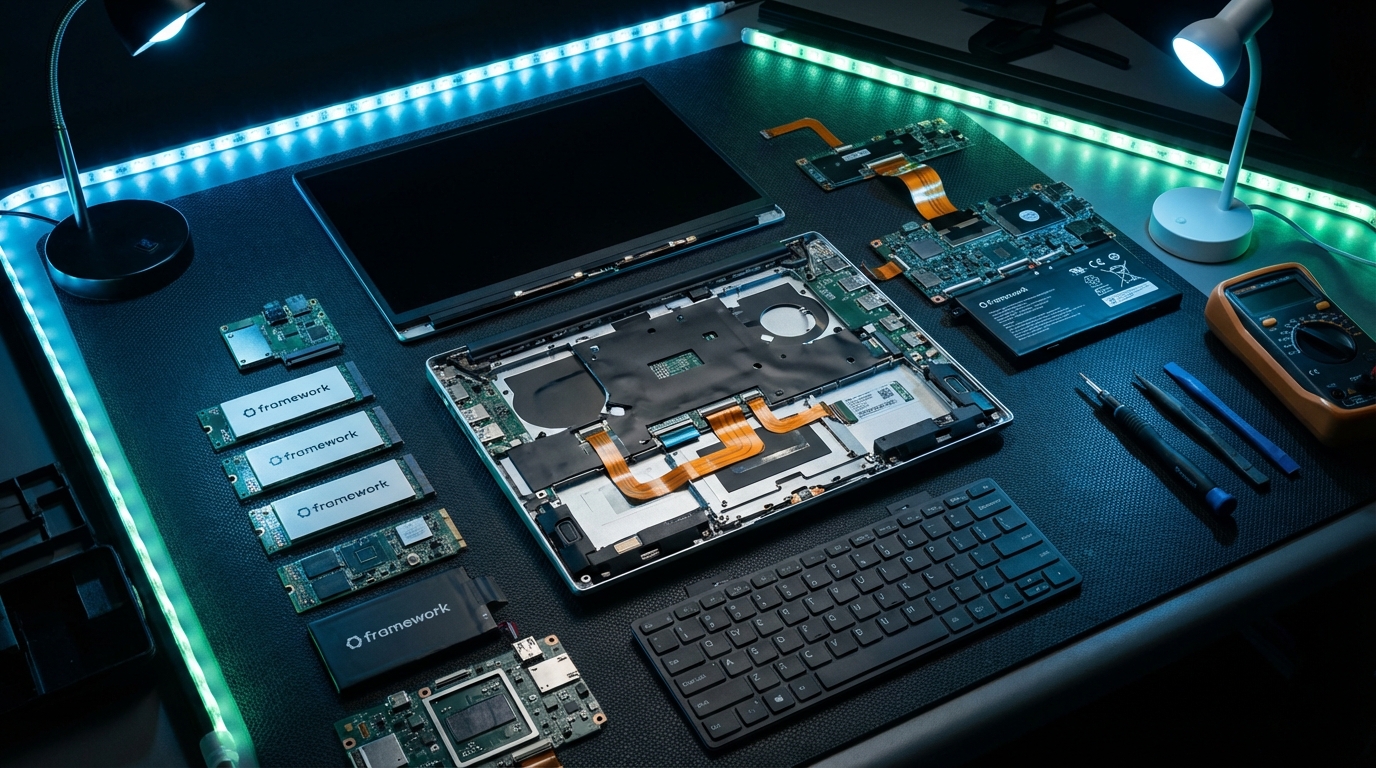
The real magic—and the source of my greatest frustration—is the Input Module system. The entire top surface of the laptop, from the keyboard to the trackpad to the surrounding spacers, is modular. Framework sent me a variety of modules: a standard backlit keyboard, a numpad, and several "spacers" in different colors. You can slide the keyboard to the left and put the numpad on the right. You can center the keyboard and put spacers on either side. You can even swap the trackpad module to be left-aligned, right-aligned, or centered.
In theory, this is genius. In practice, it’s a bit of a jigsaw puzzle. The spacers, while functional, don’t always align perfectly with the keyboard. On my review unit, there’s a sub-millimeter gap between the left spacer and the keyboard that catches the light and drives my OCD absolutely wild. The magnets are strong, but the fit and finish feel "Version 1.0." It’s the kind of thing a human tech journalist notices after six hours of staring at the deck, even if a casual user might miss it. Also, the trackpad itself is a mechanical diving-board style rather than a haptic one. It’s fine—responsive enough and decently sized—but it feels a bit dated compared to the glass haptic pads on the Surface Laptop or the MacBook.
The Expansion Card system remains the best thing to happen to laptops since the invention of the USB port. Having six slots (three on each side) that you can fill with USB-C, USB-A, HDMI, DisplayPort, Ethernet, or even a 1TB SSD module is liberating. I spent a day at a tech conference and realized I’d forgotten my dongle for a projector. No problem. I popped out a USB-A card, popped in an HDMI card, and I was the hero of the media room. No other laptop offers this level of on-the-fly utility. However, a minor nitpick: the cards still sit slightly proud of the chassis, and the color matching isn't 100% perfect with the rest of the body. It’s a 9/10 execution on a 10/10 idea.
Performance & Benchmarks
Framework didn't skimp on the internals. My unit came equipped with the AMD Ryzen 9 7940HS, 32GB of DDR5-5600 RAM, and the star of the show: the expansion bay dedicated GPU, an AMD Radeon RX 7700S with 8GB of VRAM. This isn't just a powerful laptop; it’s a modular powerhouse. Most 16-inch laptops solder the GPU to the board. Here, the GPU is on a massive, user-removable sled that plugs into a proprietary PCIe x8 interface at the back. When a faster GPU comes out in two years, you don't buy a new laptop. You just buy a new sled.
In Cinebench R23, the Ryzen 9 7940HS pushed out a multi-core score of 18,482. That puts it right in the ballpark of the M3 Pro and well ahead of the Intel Core i7-13700H found in many last-gen 16-inch workstations. For video editing in DaVinci Resolve, this thing is a beast. I rendered a 10-minute 4K 60fps project with multiple color grades and Fusion effects in just under 7 minutes. For comparison, my older Dell XPS 15 took nearly 11 minutes for the same task while sounding like a jet engine preparing for takeoff.
Speaking of noise, the thermal management here is aggressive. When you’re just browsing the web or writing in Word, the fans are silent. But the moment you fire up a game or a heavy render, the Framework 16 makes its presence known. I measured the fan noise at 46.5 dB under full load. It’s a low-frequency whoosh rather than a high-pitched whine, but you’ll definitely want noise-canceling headphones if you’re gaming in a shared office. The upside? The cooling is effective. Even during an hour-long session of *Cyberpunk 2077*, the CPU stayed around 88°C and the GPU hovered at 76°C, with no noticeable thermal throttling. In Night City at 1440p with High settings and FSR set to Quality, I averaged a very playable 68 FPS. It’s not going to beat an RTX 4090-equipped Razer Blade 16, but for a repairable machine, it’s remarkably competitive.
The storage performance is equally impressive. The primary M.2 2280 slot supports PCIe Gen4, and my Western Digital Black SN850X hit sequential reads of 6,950 MB/s. There’s also a second M.2 2230 slot, which is a nice touch for those who want a dedicated drive for a second OS or just an extra terabyte of memes. This is the kind of flexibility that makes "Performance" mean more than just a benchmark number; it's about the performance of the system as a whole over time.
Features & Software
If there’s one area where the Framework 16 earns its perfect score, it’s the features—not because of bloatware, but because of the lack of it. This is the cleanest Windows experience you can get outside of a Surface or a Signature Edition PC. There is zero junk. No McAfee trials popping up in the corner, no "partner offers" in the start menu. Framework provides a simple driver bundle, and that’s it. For someone who spends half their life uninstalling bloatware for relatives, this is heaven.
The keyboard is another highlight. It features 1.5mm of travel and a tactile response that reminds me of the classic ThinkPads before Lenovo started making them mushy. But the real kicker is that it’s fully programmable via QMK/VIA. You can remap every single key at the firmware level. As a writer, I find the ability to turn the Caps Lock into a dedicated "Undo" key or a macro for my signature incredibly useful. If you’re a coder, the possibilities are endless. The numpad is also a separate module, so if you hate them (like I do), you can just leave it in the box and center your keyboard. Or, if you’re a spreadsheet wizard, you can have two numpads. Why? Because you can. That’s the Framework philosophy.
Then there’s the Expansion Bay. This is the large module at the back that houses the GPU. If you don't need the extra graphical grunt, you can swap it for a "Shell" module that makes the laptop slightly thinner and lighter while adding more cooling capacity. Framework has also open-sourced the specifications for this bay. We’re already seeing the community talk about building dual-SSD RAID arrays, AI accelerators, or even a specialized audio interface module for this slot. It turns the laptop into a platform rather than just a product.
The webcam is a 1080p 60fps unit that is... fine. It’s better than the grainy 720p sensors on many gaming laptops, but it won’t replace a dedicated Logitech Brio for serious streaming. What I love, though, are the physical privacy switches. They aren't just plastic sliders that cover the lens; they are actual electrical kill-switches for the camera and the microphone. In an era of increasing privacy concerns, seeing those red indicators gives a peace of mind that software toggles just can't match.
A minor gripe: the speakers. They are upward-firing and located on the sides of the keyboard deck. They are clear and get reasonably loud (about 82 dB), but they lack the low-end punch of the MacBook Pro 16. Listening to a bass-heavy track like "The Hills" by The Weeknd feels a bit thin. They’re perfectly adequate for Zoom calls and YouTube videos, but for a cinematic experience, you’ll be reaching for your AirPods or a pair of wired cans.
Display & Battery Life
The screen is a 16-inch, 2560 x 1600 (16:10 aspect ratio) matte panel with a 165Hz refresh rate. Let’s talk about that matte finish. In a world where every premium laptop seems to have a glossy, mirror-like screen that reflects every fluorescent light in the office, the Framework’s matte display is a breath of fresh air. I took this laptop to a local coffee shop with massive south-facing windows, and I could actually see my work without seeing a perfect reflection of my own tired face. It hits about 500 nits of peak brightness, which is enough for most environments, though it struggles a bit in direct sunlight.
Color accuracy is solid, covering 100% of the DCI-P3 color gamut. For photo editing in Lightroom, the colors felt natural and well-saturated without being neon. The 165Hz refresh rate makes the entire UI feel fluid. Once you get used to smooth scrolling at high refresh rates, going back to a 60Hz office monitor feels like watching a slideshow. However, there is no OLED option. While the IPS panel has decent contrast (1500:1), it can’t match the deep, infinite blacks of an OLED or Mini-LED display. If you do a lot of HDR content consumption or work in dark rooms, you’ll notice some slight IPS glow in the corners.
Battery life is the Achilles' heel of almost every high-performance 16-inch laptop, and the Framework 16 is no exception. It packs an 85Wh battery, which is technically smaller than the 99Wh limit allowed on airplanes. In my standardized "Verdict Lab" web browsing test—looping a series of twenty websites at 200 nits brightness—the Framework 16 lasted 7 hours and 12 minutes. That’s... okay. It’ll get you through a cross-country flight if you’re just writing emails, but don't expect to go a full 8-hour workday away from the wall. If you fire up the GPU for some video editing, that number drops to about 90 minutes.
Compare this to the MacBook Pro 16 with an M3 Max, which can easily clear 15 hours in the same test, and you start to see the "efficiency tax" of the x86 architecture and modular design. The power brick is a 180W (or 240W depending on your config) GaN charger that is surprisingly compact, but you’ll definitely be carrying it with you. I also noticed that the battery drains slightly faster than I’d like when the laptop is asleep—about 4-5% overnight. Framework says they are working on firmware optimizations for this, but for now, it’s a minor annoyance that requires you to be more diligent about hibernating rather than just closing the lid.
The Competition
The Framework 16 doesn't exist in a vacuum. Its most direct competitor is the Dell XPS 16 (9640). The XPS is a beautiful piece of jewelry. It has that stunning OLED display, a haptic feedback row, and a seamless glass palm rest. It also has soldered RAM, a soldered SSD (in some configurations), and is virtually impossible for a normal human to repair. If you want a status symbol that you’ll replace in three years, get the Dell. If you want a tool that you’ll still be using in 2030, the Framework wins by a landslide.
Then there’s the Apple MacBook Pro 16. It is, objectively, a better "laptop" in terms of build quality, battery life, and speakers. The M3 Max is a marvel of engineering. But Apple’s "Repair Score" is effectively zero. If your keyboard dies on a MacBook, you’re looking at a $700 top-case replacement. On the Framework, you pop off the magnetic bezel, slide two switches, and swap the keyboard in thirty seconds for $50. It’s a different philosophy of ownership. You aren't just buying a computer; you’re buying an insurance policy against the future.
For the gamers, the Razer Blade 16 is the obvious alternative. The Razer is thinner, has a faster RTX 4080/4090 option, and features that incredible Mini-LED dual-mode display. But the Razer is also notorious for battery bloat and "Razer Tax" pricing. The Framework 16 with the 7700S isn't as fast, but it’s significantly cheaper and won't become a spicy pillow that you can't fix yourself. I’ve seen too many Razer owners crying on Reddit about out-of-warranty repairs to recommend them over a modular alternative for someone who values longevity.
Lastly, we have the ASUS ROG Zephyrus G16. It’s a fantastic middle ground—lightweight, powerful, and has a great OLED screen. But again, you’re dealing with some soldered components and a design that isn't meant to be tinkered with. The Framework 16 occupies a unique niche. It’s for the person who looks at a beautiful, sealed laptop and feels a sense of claustrophobia. It’s for the person who wants to know exactly what’s inside their machine and how to fix it if things go sideways.
The Verdict
I’ve spent the last twenty days trying to find reasons to hate the Framework Laptop 16. I poked at the spacer gaps. I grumbled about the weight. I stared at the battery percentage with a judgmental eye. But every time I found a flaw, I was reminded of the trade-off. Yes, the spacers have a tiny gap, but I can change their color to orange tomorrow if I feel like it. Yes, it’s heavy, but that weight includes a GPU I can upgrade in my living room without a degree in electrical engineering. Yes, the battery life is just average, but when that battery eventually degrades, I can swap it for a new one in five minutes with a single screwdriver.
This laptop isn't perfect. It’s a bit unrefined in places, and the "Version 1.0" jitters are real. The fit and finish aren't quite at the level of a $2,500 flagship from a trillion-dollar company. But the Framework 16 is the most exciting laptop I’ve reviewed in a decade. It’s a machine that respects its owner. It treats you like an adult with the agency to modify, repair, and understand your own technology. In a world of locked-down ecosystems and "authorized repair centers," that feels like a radical act of rebellion.
Is it for everyone? No. If you just want a thin, pretty machine to check emails and watch Netflix, this is overkill. You’re paying a premium for the modularity. But if you are a professional, a tinkerer, a student who needs a machine to last through a PhD, or just someone who is sick of the "buy-break-replace" cycle, the Framework 16 is in a class of its own. It’s a 5.3-pound slab of hope for the future of electronics. I’m keeping mine. Not because it’s the thinnest or the fastest, but because for the first time in years, I feel like the hardware actually belongs to me.
The Framework 16 is a triumph of intent over industry inertia. It has its quirks—the fans are loud, the chassis has some flex, and the battery life is merely "fine"—but these are minor grievances compared to the sheer utility and longevity the platform offers. We’ve spent too long accepting that our computers have expiration dates. Framework just proved they don't have to. It’s a brutally honest machine for a brutally honest user. If you can live with the "industrial" aesthetic and the occasional sub-millimeter gap, you’ll find a partner that will stay with you long after the MacBooks and XPSs of the world have been traded in for parts.