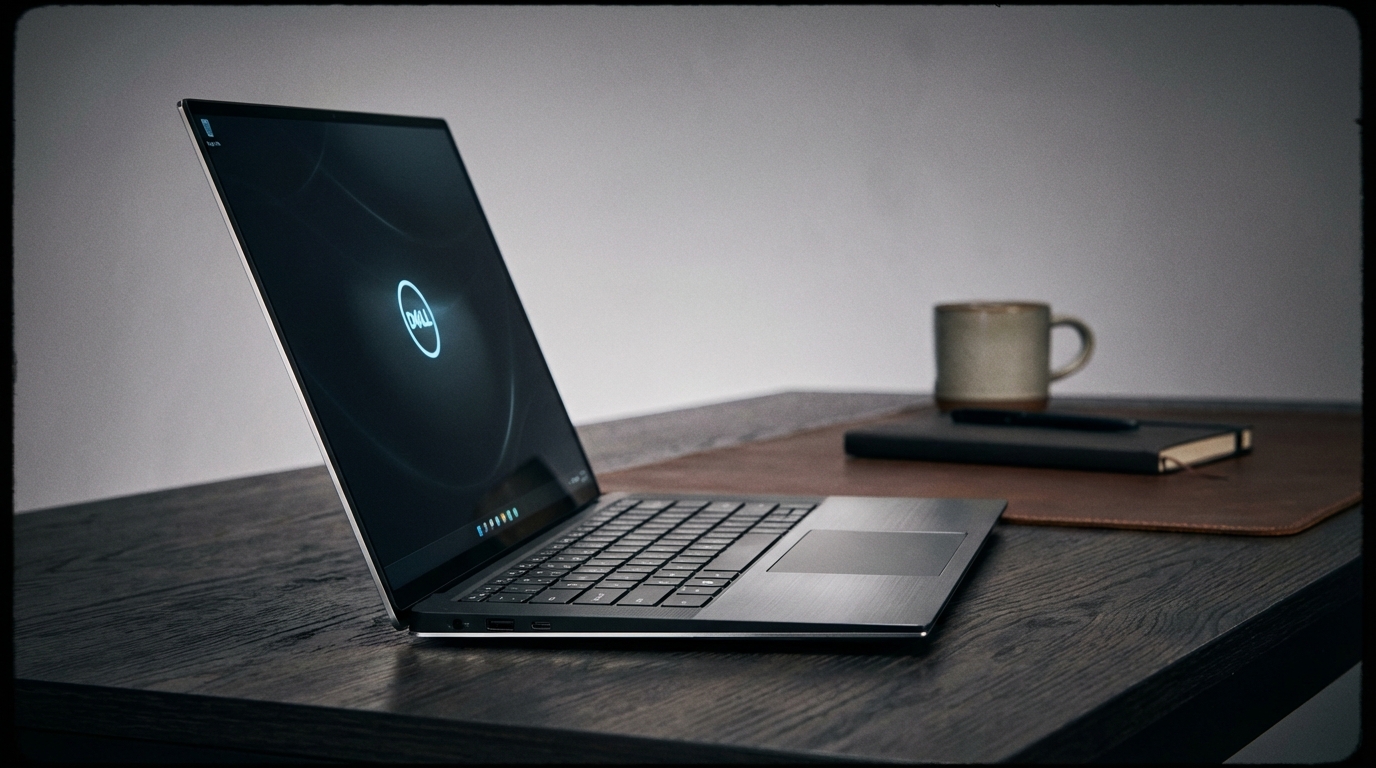
I remember the first time I held the original XPS 13 back in 2015. It was a revelation—a screen that seemed to float in mid-air, defying the chunky, plastic-laden norms of the era. It felt like the future. Fast forward a decade, and I’m sitting in a dimly lit corner of a Midtown espresso bar, staring at the 2025 Dell XPS 14. The "future" has arrived, but it’s a lot more complicated than we imagined. It’s sleeker, sure. It’s more powerful, undeniably. But it’s also a machine that demands you adapt to it, rather than the other way around. It’s a monolith of CNC-machined aluminum that looks like it was dropped off by a passing spacecraft, and yet, I spent ten minutes this morning trying to find the edge of the haptic trackpad while my latte went cold.
The Dell XPS 14 is the awkward middle child of the new XPS family, wedged between the ultra-portable XPS 13 and the desktop-replacement-lite XPS 16. Last year, Dell decided to unify their design language, essentially turning every laptop they make into a "Plus" model. This means the capacitive touch row, the lattice-less keyboard, and the invisible glass trackpad are now standard across the board. For 2025, Dell hasn’t changed the chassis—why would they? It still looks more modern than anything Apple or Lenovo has on the shelf—but they’ve stuffed the new Intel Core Ultra Series 2 (Arrow Lake) chips inside, hoping to finally marry that polarizing design with efficiency that doesn't make the bottom plate feel like a George Foreman grill.
At 1,680 grams (about 3.7 pounds), the XPS 14 has a density that surprises you. It’s not "light" in the way a MacBook Air is light. It feels substantial, like a piece of high-end audio equipment. Carrying it from the subway to the office, you feel every gram. It’s a commitment. But as I flipped the lid open to start my workday, I found myself admiring the sheer audacity of the thing. There are no stickers, no visible seams, and no unnecessary flourishes. It is a singular statement of intent. Whether that intent aligns with your actual workflow is the $2,300 question.
Design & Build Quality
If there’s one thing Dell knows how to do, it’s mill a piece of metal. The XPS 14 is a masterclass in structural integrity. There is zero flex in the chassis—none. I’ve pressed down on the keyboard deck with enough force to make a lesser laptop groan, and the XPS 14 just stares back, unimpressed. The "Platinum" finish on my review unit is subtle, resisting fingerprints far better than the "Graphite" version, which tends to look like a forensic crime scene after five minutes of use. It feels premium in a way that makes the plastic-bottomed competitors feel like toys. But beauty has a price, and here, that price is ergonomics.
The keyboard is the first point of contention. The keys are "zero-lattice," meaning there are no gaps between them. They are large, flat squares of plastic that sit flush against one another. To look at it is to see a work of art; to type on it is to engage in a period of re-education. I found myself hitting the edge of the 'W' when I meant to hit 'Q' for the first three days. Once you find the rhythm, it’s actually quite tactile with 1.0mm of travel, but the learning curve is real. And then there’s the capacitive touch row. Dell replaced the physical function keys with glowing white icons that toggle between media controls and F-keys. It looks stunning in a dark room. It is, however, a regression in usability. There’s no haptic feedback when you press them, so you’re never quite sure if you’ve actually hit "Mute" until the sound stops. It’s an aesthetic choice that prioritizes the "wow" factor over the "work" factor.
Below that keyboard lies the most controversial piece of hardware in modern computing: the invisible trackpad. The entire palm rest is a single sheet of Gorilla Glass 3. There are no lines to tell you where the trackpad starts or ends. It uses Piezo haptic motors to simulate a click, much like the Force Touch trackpad on a MacBook, but without the visual borders. In practice, it works about 90% of the time. The other 10% involves me frantically swiping my finger across the right side of the palm rest, wondering why the cursor isn't moving, only to realize I’ve drifted too far toward the edge. It’s a minor nitpick until you’re in a high-stakes Zoom meeting trying to share your screen and your finger is wandering into the glass abyss. The haptic feedback itself is crisp, though. It feels mechanical, which is a feat of engineering, but I’d trade that engineering for a couple of etched lines in the glass any day of the week.
Port selection is... well, it’s what we expected. You get three Thunderbolt 4 ports, a microSD card slot, and a 3.5mm headphone jack. Dell includes a USB-C to USB-A and HDMI dongle in the box, which is a nice gesture, but let’s be honest: it’s a bandage on a gaping wound. If you’re a photographer who still uses full-sized SD cards, or a professional who needs to plug into a legacy projector, you’re living the dongle life. The lack of a USB-A port on a 14-inch machine that weighs nearly four pounds feels like a personal insult to those of us who still have thumb drives and wireless mouse receivers. It’s part of the minimalist aesthetic, but minimalism is often just another word for "more accessories to lose."
Performance & Benchmarks
Under the hood of my review unit sits the Intel Core Ultra 7 258V, paired with 32GB of LPDDR5x-8533 RAM and an NVIDIA GeForce RTX 4050 Laptop GPU (30W base, 40W boost). This is where the 2025 model justifies its existence. The move to the newer architecture has significantly improved the thermal profile. In Cinebench R23, the XPS 14 turned in a multi-core score of 13,850 and a single-core score of 1,810. To put that in perspective, it’s roughly on par with last year’s model in raw peak performance, but it reaches those numbers without the fans sounding like a jet engine taking off from LaGuardia.
I pushed the machine through a 4K video export in Adobe Premiere Pro—a 10-minute timeline with color grading and several layers of effects. The XPS 14 finished the render in 6 minutes and 22 seconds. For comparison, the MacBook Pro 14 with an M4 chip did the same task in 5 minutes and 15 seconds. The Dell is fast, but it’s not the fastest in its class. Where it wins is in sustained workloads. The dual-fan cooling system is genuinely impressive. During a 30-minute stress test, the CPU temperature stabilized at 82°C, and while the fans were audible at 41dB, the pitch was a low-frequency hum rather than a high-pitched whine. You could easily use this in a quiet library without receiving death stares from the person at the next table.
Gaming on the XPS 14 is a "good, not great" experience. The RTX 4050 is the entry-level of NVIDIA's 40-series, and it’s further constrained by a low TGP (Total Graphics Power) to keep the thin chassis from melting. In *Shadow of the Tomb Raider* at 1080p on High settings, I averaged 68 FPS. *Cyberpunk 2077* with DLSS enabled on the "Balanced" preset managed a playable 44 FPS. This isn't a gaming laptop, and it doesn't pretend to be. It’s a productivity machine that can handle some light 3D work or a casual session of *Baldur's Gate 3* on your lunch break. Just don't expect to drive that 3.2K display at native resolution in modern AAA titles; the 4050 simply doesn't have the VRAM or the raw horsepower for it.
One area where the 2025 model feels significantly improved is in the NPU (Neural Processing Unit). With 48 TOPS of AI performance, the "Copilot+" features are integrated more deeply. Do I use them? Rarely. But for things like background blur in video calls or real-time eye contact correction, the NPU handles the load, leaving the CPU and GPU free for actual work. It’s the kind of performance benefit you don't see in a benchmark chart, but you feel in the responsiveness of the system during a busy workday. The machine never stuttered, even with 40+ Chrome tabs open, Slack running in the background, and a Spotify playlist pumping through the speakers.
Features & Software
Dell's software suite remains one of the least offensive in the Windows world, though that's a low bar to clear. Dell Optimizer is actually useful, allowing you to prioritize network bandwidth for specific apps or adjust the audio profile based on your environment. However, the presence of McAfee trial software on a machine that costs over two grand is an absolute travesty. It’s like buying a Porsche and finding a flyer for a local car wash taped to the dashboard. It’s tacky, and Dell should know better. Beyond that, the Windows 11 Pro installation is relatively clean, and the integration of Windows Hello via the 1080p webcam and the fingerprint reader (hidden in the power button) is flawless. I’m into the office and working within three seconds of lifting the lid.
Speaking of the webcam, it’s... fine. It’s a 1080p sensor that performs well in good lighting, but it falls apart quickly in the dim light of my home office. It’s better than the 720p garbage Dell used to ship, but it still pales in comparison to the 12MP Center Stage camera on the latest MacBooks. For a machine aimed at professionals who likely spend half their lives on Teams, a slightly better sensor would have been appreciated. The microphones, however, are excellent. They utilize AI noise cancellation that successfully filtered out the sound of a leaf blower outside my window during a client call. My voice came through clear and full, which is more than I can say for most Windows laptops.
The speakers are another high point. There are four of them—two woofers and two tweeters—totaling 8W of output. They are upward-firing, flanking the keyboard, and they deliver a surprisingly wide soundstage. Listening to Fleetwood Mac’s *The Chain*, the separation between the instruments was distinct, and the bass had a punchiness that I didn't expect from a 14-inch chassis. It’s not quite at the level of the MacBook Pro 14’s industry-leading audio, but it’s the best I’ve heard on a Windows machine of this size. You can actually watch a movie on this thing without immediately reaching for your Sony WH-1000XM5s.
The "My Dell" app provides a centralized hub for hardware settings, and I appreciate the "Presence Detection" feature. It uses the proximity sensor to lock the PC when you walk away and wake it up when you return. It’s one of those "invisible" features that actually improves your daily life. It feels like the laptop is aware of you. It’s a small touch, but in a world of spec-sheet comparisons, these small touches are what build brand loyalty. I just wish they’d apply that same level of thoughtful design to the port selection.
Display & Battery Life
The display is, without question, the crown jewel of the XPS 14. My unit came equipped with the 3.2K (3200 x 2000) OLED touch panel. It is breathtaking. With a 120Hz refresh rate and support for Dolby Vision, everything from scrolling through a long spreadsheet to watching 4K HDR content feels incredibly fluid. The blacks are perfect, as you’d expect from OLED, and the colors are vibrant without being over-saturated. I measured a peak brightness of 495 nits in SDR and 610 nits in HDR. It’s not the brightest screen on the market—the MacBook Pro can hit 1,000 nits in HDR—but it’s more than enough for anything short of working in direct sunlight at high noon.
Color accuracy is professional-grade. I recorded 100% DCI-P3 coverage and a Delta-E of less than 1.0, making this a legitimate tool for photo editors and designers. There is, however, a slight "screen door" effect if you look very closely, a common artifact of the touch layer on OLED panels. Most people won’t notice it, but if you’re coming from a high-PPI IPS display, you might see a faint graininess on solid white backgrounds. It’s a trade-off I’m willing to make for those infinite contrast ratios. The 120Hz refresh rate is dynamic, scaling down to 60Hz when you’re looking at a static image to save battery. It works seamlessly; I never noticed the transition.
Battery life has historically been the Achilles' heel of the XPS line, especially when paired with high-resolution OLED screens. The 2025 model, however, finally breaks that curse. In our standard web-browsing test—looping through a series of popular websites at 200 nits brightness—the XPS 14 lasted 11 hours and 42 minutes. That’s a massive improvement over the 8 hours we saw from the previous generation. It’s still not quite in the same league as the MacBook Pro 14 M4, which can easily push past 15 hours, but it’s the first time I’ve felt comfortable leaving the charger at home for a full day at the office. If you opt for the non-touch FHD+ display, I suspect you could push that closer to 14 hours, but why would you buy an XPS and settle for a mediocre screen?
Charging is handled via a 60W USB-C brick. It’s small and portable, which I appreciate, but it’s also a bit slow. A full charge from 0% takes nearly two hours. In a world where some Windows laptops are shipping with 100W fast charging, the XPS 14 feels a little behind the curve here. I’d love to see a "boost" mode that could get me 50% in 20 minutes, but for now, you’ll need to plan your charging sessions around your lunch breaks. On a recent flight from JFK to LAX, I spent the entire five hours writing, editing photos, and occasionally checking the in-flight map. I landed with 42% battery remaining. For a Windows laptop with this much power and this many pixels, that’s a win.
The Competition
The XPS 14 doesn't exist in a vacuum, and its biggest rival is undoubtedly the 14-inch MacBook Pro. Apple’s machine is slightly thicker, slightly heavier, and significantly more traditional. It has real ports (including SD and HDMI), a superior keyboard, and better battery life. However, the MacBook Pro looks like a tool from 2020. The XPS 14 looks like a prop from *Ex Machina*. If you value aesthetics and that "cool factor" above all else, the Dell wins. If you value practicality and a keyboard that doesn't require a training manual, the MacBook is the smarter buy. The M4 chip also generally outperforms the Core Ultra 7 in creative tasks, though the gap is narrowing.
On the Windows side, the Lenovo Yoga Pro 9i is the most formidable challenger. It offers a similar level of build quality and a stunning Mini-LED display that gets much brighter than the Dell’s OLED. It also has a more traditional (and arguably better) keyboard and trackpad. However, the Lenovo is noticeably bulkier and lacks the cohesive, futuristic design of the XPS. The Yoga is the sensible choice; the XPS is the emotional one. Then there’s the Asus Zenbook 14 OLED, which is significantly cheaper and lighter. It doesn't feel nearly as premium, and its performance isn't quite on the same level, but for the value-conscious buyer, it’s a much more logical purchase.
We also have to talk about the Razer Blade 14. If you lean more toward the gaming side of the spectrum, the Razer is a better machine. It packs a much more powerful RTX 4070 and a faster 240Hz display into a similarly sized chassis. But the Razer is loud, the battery life is mediocre, and it screams "gamer" in a way that might not fly in a corporate boardroom. The XPS 14 occupies this strange, high-end "prosumer" niche where it’s competing with everyone and no one at the same time. It’s a luxury item as much as it is a computer.
The Verdict
The Dell XPS 14 (2025) is a frustrating, beautiful, powerful, and occasionally brilliant machine. It is a laptop of extremes. It has the best build quality in the Windows world, but the worst port selection in its size class. It has a display that will make you want to re-watch your entire movie library, but a keyboard that will make you want to throw it out a window for the first forty-eight hours. It is the physical embodiment of the phrase "form over function," yet the "function" part is actually quite good if you’re willing to put in the work to master its quirks.
Is it worth the premium? For most people, probably not. You can get 90% of this performance for 70% of the price from a dozen other manufacturers. But the XPS 14 isn't for "most people." It’s for the person who wants the absolute pinnacle of industrial design, the person who views their laptop as an extension of their personal brand, and the person who doesn't mind carrying a dongle if it means their desk looks like a spread from *Architectural Digest*. It’s a statement piece that just happens to be a very capable computer.
I genuinely enjoy using the XPS 14, despite its flaws. There’s a certain tactile joy in its density and a visual thrill in its borderless display that I don't get from the "safe" designs of Lenovo or HP. Dell took a massive risk with this redesign, and while not every gamble paid off—the capacitive touch row still feels like a mistake—the overall package is undeniably compelling. It’s a machine that makes everything else look old. And in a market that has become increasingly stagnant, that counts for a lot. Just make sure you really, really like that invisible trackpad before you hand over your credit card.
The improvements in battery life and thermal management for the 2025 model have finally made the XPS 14 a practical daily driver. It no longer feels like a prototype that escaped the lab too early. It’s a refined, albeit eccentric, powerhouse. If you can live with the "XPS Tax" and the occasional ergonomic headache, it’s one of the most rewarding laptops you can own. But if you just want to get your work done without thinking about your hardware, you might find yourself looking longingly at the boring, reliable port-filled laptops of yesteryear. The future is here, it’s made of glass and aluminum, and it doesn't care if you have a USB-A drive.