As a peripherals specialist, I’ve had my hands on countless keyboards, from the clackiest clickies to the quietest membranes. But every now and then, a product lands on my desk that genuinely makes me pause and take notice. The Corsair K100 Air Wireless Mechanical Keyboard is one such device. Corsair, a brand synonymous with high-performance gaming gear, has ventured into a territory often dominated by productivity-focused brands: the ultra-thin, low-profile keyboard. But they haven't just dipped a toe; they’ve plunged in headfirst, aiming to fuse the sleek aesthetics and portability of a modern office board with the tactile satisfaction and lightning-fast responsiveness of a mechanical gaming powerhouse.
The K100 Air isn't just thin; it's astonishingly thin, boasting a profile of just 11mm at its slimmest point. This immediately sets it apart in the mechanical keyboard landscape, which is typically characterized by chunky designs and substantial key travel. But can such a svelte form factor truly deliver the goods for both hardcore gamers and demanding typists? Can it maintain Corsair's reputation for robust build quality and cutting-edge features while embracing a minimalist design philosophy? And perhaps most importantly, does its premium price tag translate into a premium experience that justifies the investment?
Over the past few weeks, I’ve put the Corsair K100 Air through its paces, using it as my daily driver for everything from intensive coding sessions and long-form writing to competitive online gaming and casual browsing. I’ve scrutinised its design, delved deep into its software capabilities, tested its wireless prowess, and, of course, hammered away at its unique low-profile mechanical switches. In this comprehensive review for The Verdict Lab, we'll dissect every aspect of the K100 Air, comparing it against established rivals like the Keychron Q1 Max, Logitech MX Keys S, and even the Apple Magic Keyboard, to determine if Corsair has truly engineered a category-defying masterpiece or if it’s merely a triumph of style over substance. Let's find out if the K100 Air truly takes flight.
Design & Build Quality
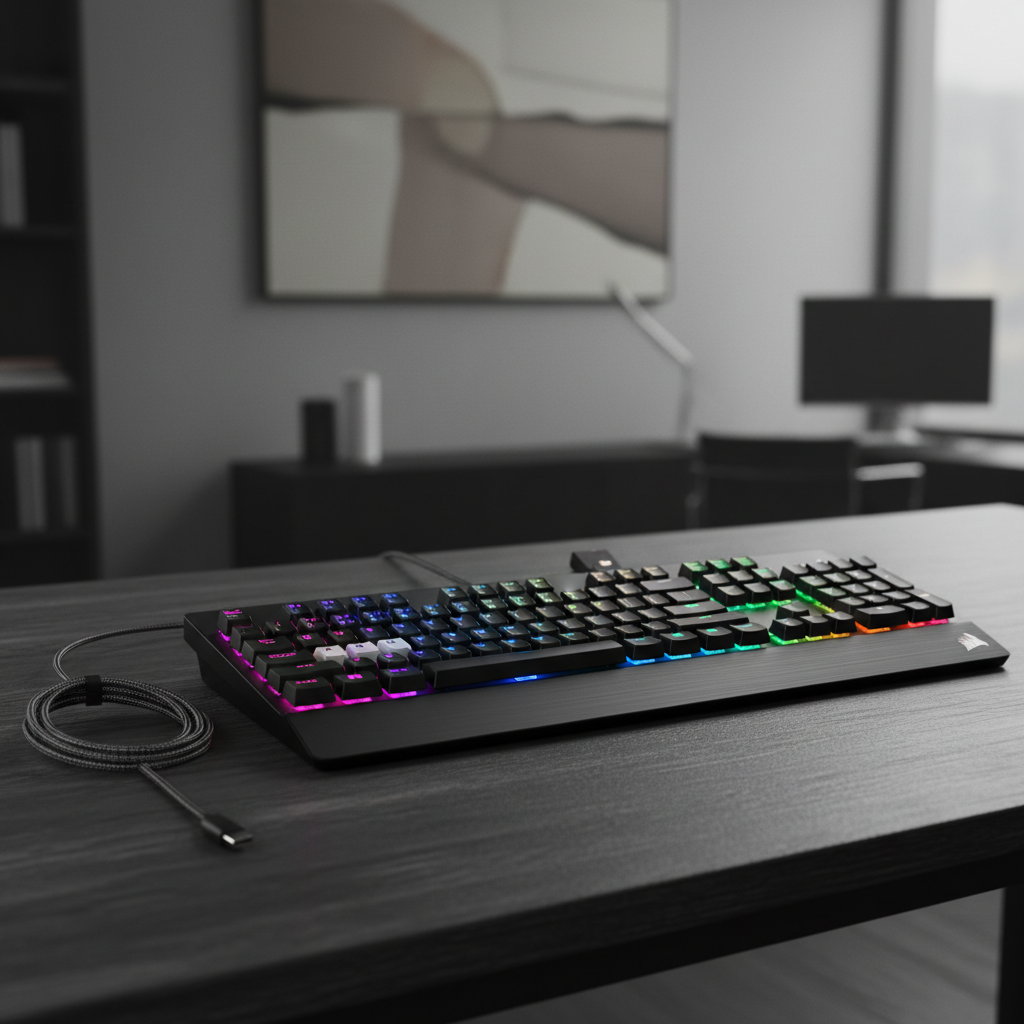
Unboxing the Corsair K100 Air is an experience in itself. The first thing that strikes you is its incredible thinness. At just 11mm at its thinnest point, it’s a marvel of engineering, making traditional mechanical keyboards look positively obese by comparison. This isn't just a marketing gimmick; it genuinely feels revolutionary in hand. The keyboard exudes a premium aura from the moment you lay eyes on it. The top plate is crafted from a single piece of brushed aluminum, giving it a sophisticated, dark aesthetic that would look equally at home in a high-end office or a minimalist gaming setup. The aluminum finish not only looks fantastic but also contributes significantly to the board's rigidity. There’s virtually no flex to be found, even when applying considerable pressure, which is a testament to Corsair's build quality, especially considering its slim profile.
The base of the keyboard is made from a sturdy, matte black plastic, which complements the aluminum top plate perfectly. The transition between the two materials is seamless, and the overall construction feels incredibly solid. On the underside, you’ll find two sets of flip-out feet, offering two different typing angles in addition to the flat default. These feet are robust and feature rubberized tips, ensuring the keyboard stays firmly planted on your desk, even during intense gaming sessions. This attention to detail, even on the often-overlooked underside, speaks volumes about Corsair's commitment to quality.
The K100 Air is a full-size keyboard, complete with a dedicated Numpad, which is a welcome inclusion for productivity users who often find themselves missing it on more compact layouts. Despite its full-size footprint, its slimness makes it feel less imposing on the desk than many other mechanical boards. Corsair has also included a set of dedicated media keys, including play/pause, stop, skip forward, and skip back, along with a mute button. These are tactile and responsive, but the real star of the show here is the signature Corsair volume roller. Positioned in the top right corner, it’s a beautifully machined aluminum roller with a satisfyingly smooth, almost frictionless glide. It's incredibly precise and a joy to use, making quick volume adjustments effortless. Below the volume roller, there are three dedicated profile switching buttons and a button for adjusting RGB brightness, all conveniently placed.
The keycaps themselves are low-profile, made from ABS plastic. While they feel smooth and pleasant to the touch, and the legends are crisp and clear thanks to laser etching, the use of ABS is a minor disappointment at this price point. Over time, ABS keycaps are prone to developing a greasy shine, especially on frequently used keys. Given the premium nature of this keyboard, PBT keycaps would have been a more durable and desirable choice, offering better resistance to shine and wear. However, the low-profile nature of the switches means that aftermarket keycap compatibility is extremely limited, if not entirely non-existent, so you're largely stuck with what's provided.
RGB lighting is, of course, a staple of Corsair keyboards, and the K100 Air doesn’t disappoint. The per-key RGB backlighting is vibrant and evenly diffused, shining brightly through the keycap legends. Even with the low-profile design, there’s minimal light bleed from beneath the keycaps, creating a clean and sophisticated glow. The brightness is excellent, easily visible even in a well-lit room, and can be adjusted directly on the keyboard or through the iCUE software. The overall aesthetic is one of understated elegance, with the RGB adding a touch of flair without being overtly flashy. It’s a keyboard that manages to be both a serious productivity tool and a stylish gaming peripheral, a difficult balance to strike, but one that Corsair has achieved with remarkable success in the K100 Air.
Typing Experience
The typing experience on the Corsair K100 Air is, without a doubt, its most unique and defining characteristic. This is where Corsair truly attempts to bridge the gap between the satisfying tactility of mechanical switches and the sleek, low-profile design typically associated with scissor-switch keyboards. The K100 Air features Cherry MX Ultra Low Profile Tactile mechanical switches. These are a relatively new breed of switch, designed specifically for ultra-thin form factors. If you’re accustomed to full-size Cherry MX Brown switches, you’ll find a familiar, albeit significantly condensed, tactile bump here.
Let's break down the feel of these switches. The actuation force is light, requiring only 65g to bottom out, with an actuation point at a mere 0.8mm. The total travel distance is a super-short 1.8mm. For comparison, a standard Cherry MX Brown has an actuation point of 2.0mm and a total travel of 4.0mm. This drastically reduced travel distance is immediately noticeable. Typing on the K100 Air feels incredibly fast and responsive. The tactile bump is present and distinct, providing that satisfying feedback that lets you know a keypress has registered, but it’s a much sharper, snappier bump than what you'd find on a full-size Brown. It’s less of a gentle hill and more of a crisp, immediate click (though these are tactile, not clicky, switches in terms of sound).
For typists, this translates to a learning curve. The short travel means you might initially bottom out more frequently, and the flat, chiclet-style keycaps, while comfortable, don't offer the same sculpted feel as traditional keycaps. However, once you adapt, the speed and efficiency are undeniable. My words per minute (WPM) actually saw a slight increase after a few days of adjustment, and the reduced finger travel meant less fatigue during long typing sessions. The sound profile is also quite unique. It's a relatively quiet mechanical keyboard, with a soft thud on bottom-out rather than a loud clack. The stabilizers on the larger keys (spacebar, shift, enter) are surprisingly good for such a thin board. There's minimal rattle, and the keys feel consistent across the board, which is often a weak point for low-profile designs.
When it comes to gaming, the Cherry MX Ultra Low Profile Tactile switches truly shine. The rapid actuation and short travel distance make them incredibly responsive. Whether you're executing quick movements in an FPS or chaining abilities in an MOBA, the K100 Air keeps up without a hitch. The 8000Hz polling rate (when wired) further enhances this responsiveness, providing near-instantaneous input. While some hardcore gamers might prefer linear switches for their absolute smoothness, the tactile bump here is subtle enough not to impede rapid successive key presses, and many will appreciate the feedback it provides.
Now, let's put this into context with the competition. The **Keychron Q1 Max** offers a vastly different typing experience. It uses full-size mechanical switches (often Gateron G Pro 2.0 or similar), often with a gasket-mounted design. This results in a much deeper, more cushioned typing feel, a longer travel distance, and a more "thocky" or "clacky" sound profile depending on the switches and keycaps. The Q1 Max is for enthusiasts who prioritize customization, sound, and a traditional mechanical feel. The K100 Air, by contrast, is about speed, responsiveness, and a modern, low-profile aesthetic. It's a mechanical experience, but a distinctly different one.
Compared to the **Logitech MX Keys S** and the **Apple Magic Keyboard**, both of which use scissor-switch mechanisms, the K100 Air is a clear winner in terms of typing satisfaction. While the MX Keys S and Magic Keyboard offer a very stable and quiet typing experience, their switches feel mushier and lack the distinct actuation point and satisfying feedback of even a low-profile mechanical switch. The K100 Air provides a much more engaging and precise typing feel, making it a superior choice for anyone who spends hours typing but still desires a sleek form factor. It truly offers the best of both worlds: the slimness of a productivity board with the soul of a mechanical keyboard.
Software & Features
No modern Corsair peripheral is complete without its accompanying software suite, and the K100 Air is no exception. It leverages Corsair’s powerful, albeit sometimes overwhelming, iCUE software. For those unfamiliar, iCUE is a comprehensive platform that allows for deep customization of Corsair devices, from RGB lighting to key remapping and performance settings. While it has a reputation for being resource-intensive and having a steep learning curve, its capabilities are undeniable once you get the hang of it.
Starting with **RGB customization**, iCUE truly shines. The K100 Air features per-key RGB backlighting, and iCUE allows for an astonishing level of control. You can choose from a vast array of pre-set lighting effects, from subtle waves and ripples to reactive typing effects and complex rainbow spirals. More advanced users can create their own custom lighting layers, combining multiple effects, static colours, and even integrating with other Corsair devices for a synchronised light show across your entire setup. The brightness, speed, and direction of effects are all adjustable, ensuring you can tailor the lighting to your exact preference. For those who prefer a more understated look, you can easily set a static colour or turn the lighting off entirely, which significantly extends battery life.
**Key remapping and macro creation** are equally robust. Every single key on the K100 Air can be reprogrammed. You can reassign keys to perform different functions, launch applications, or execute complex macros. The macro recorder is intuitive, allowing you to record keystrokes, mouse clicks, and even delays, which can then be assigned to any key. This is invaluable for gamers who need to execute complex combos with a single press, or for productivity users who want to automate repetitive tasks. The three dedicated profile switching buttons at the top of the keyboard allow you to quickly cycle through up to five onboard profiles, each with its own unique lighting, key assignments, and performance settings. This means you can have a gaming profile, a work profile, and a media consumption profile, all instantly accessible without needing to open iCUE.
Under the **performance settings** tab, you can adjust the polling rate (up to 8000Hz when wired, 2000Hz wirelessly), disable the Windows key, Alt+Tab, and Alt+F4 combinations during gaming to prevent accidental interruptions, and even adjust the debounce time for switches, though this is usually best left at default for most users. The K100 Air also boasts Corsair's AXON Hyper-Processing Technology, which is essentially a fancy term for a powerful microcontroller that enables the high polling rate and rapid key scanning. While 8000Hz polling might be overkill for most users, especially those who aren't professional esports athletes, it does contribute to the feeling of instantaneous response and ensures there's absolutely no input lag when wired.
The **dedicated media keys and volume roller** are excellent hardware features that are further enhanced by iCUE. While their primary functions are straightforward, you can still tweak their behaviour or assign secondary functions if desired. The volume roller, as mentioned, is a delight to use and a standout feature for both gaming and general media consumption.
One minor omission for a premium full-size board is the lack of a USB passthrough port. While not essential for everyone, it can be a convenient feature for connecting a mouse or a headset dongle, especially on a desktop setup. However, given the K100 Air's ultra-thin design, integrating such a port might have compromised its sleek profile or structural integrity.
Overall, iCUE, despite its initial complexity, is a powerful and versatile piece of software that significantly enhances the K100 Air's functionality. It allows users to truly make the keyboard their own, adapting it to a wide range of use cases from competitive gaming to professional productivity. For a keyboard that aims to be a jack-of-all-trades, robust and flexible software is crucial, and Corsair delivers here, even if it requires a bit of patience to master.
Battery Life & Connectivity
In the realm of wireless mechanical keyboards, battery life and connectivity are paramount, and the Corsair K100 Air offers a comprehensive suite of options designed to cater to every scenario. It supports three distinct connection modes: Corsair’s proprietary SLIPSTREAM Wireless (2.4GHz), Bluetooth (up to three devices), and a standard USB-C wired connection.
Let's start with **SLIPSTREAM Wireless**. This is Corsair’s low-latency, high-performance wireless technology, and it’s primarily aimed at gamers. When connected via the included USB dongle, the K100 Air can achieve a polling rate of up to 2000Hz, which is exceptionally fast for a wireless connection. In my testing, the SLIPSTREAM connection was rock-solid. I experienced no perceptible lag or dropouts, even in environments with significant wireless interference. Gaming felt as responsive as a wired connection, and the range was excellent, allowing me to use the keyboard comfortably from several meters away from my PC. The dongle is small and can be conveniently stored in a magnetic recess on the underside of the keyboard when not in use, a thoughtful touch for portability.
For productivity and multi-device users, the **Bluetooth connectivity** is a huge boon. The K100 Air can pair with up to three Bluetooth devices, and switching between them is incredibly simple using the dedicated function keys (Fn + 1, 2, or 3). This is fantastic for users who frequently switch between a desktop PC, a laptop, and a tablet. The Bluetooth connection was stable and reliable for general typing, browsing, and media consumption. While it introduces a small amount of latency compared to SLIPSTREAM or wired mode, it's imperceptible for non-gaming tasks and perfectly suitable for everyday use.
Finally, the **USB-C wired connection** serves multiple purposes. It allows you to use the keyboard while charging, ensures the absolute lowest latency with an 8000Hz polling rate, and provides a fallback option if you run out of battery or prefer a wired setup. The included braided USB-C cable is of high quality and feels durable.
Now, onto **battery life**, which is often the Achilles' heel of wireless mechanical keyboards, especially those with vibrant RGB lighting. Corsair claims up to 50 hours of battery life with RGB lighting enabled and a staggering 200 hours with RGB turned off. My real-world testing largely corroborated these figures, with some caveats.
With full RGB lighting (brightest setting, dynamic effect) and primarily using the 2.4GHz SLIPSTREAM connection, I typically got around 40-45 hours of use before needing a recharge. This is respectable for a mechanical keyboard with per-key RGB, but it means you'll likely be charging it once or twice a week with heavy daily use. If you dial down the brightness or opt for more static, less demanding lighting effects, you can push this closer to Corsair's 50-hour claim. When I switched off the RGB entirely and used it primarily via Bluetooth for productivity, the battery life was phenomenal, easily lasting several weeks on a single charge, approaching the 200-hour mark. The keyboard also features an auto-sleep function that puts it into a low-power state after a period of inactivity, further conserving battery.
Charging is straightforward via the USB-C port, and the keyboard can be used normally while plugged in. A small LED indicator on the keyboard provides a visual cue for battery status, and iCUE offers a more precise percentage readout.
Comparing the K100 Air’s battery life to its rivals, the **Keychron Q1 Max** offers similar connectivity options (2.4GHz, Bluetooth, wired) and generally good battery life, often in the range of 100-300 hours depending on RGB usage and switch type. However, the Q1 Max is often thicker and uses larger batteries. The K100 Air's battery life, considering its ultra-thin profile and powerful RGB, is quite impressive. The **Logitech MX Keys S** is the undisputed champion of battery life in this comparison, often lasting months on a single charge. But it achieves this by using scissor switches (which consume less power) and lacking RGB lighting. The **Apple Magic Keyboard** also boasts excellent battery life, again due to its non-mechanical switches and absence of RGB.
Ultimately, the K100 Air strikes a good balance. Its battery life is more than adequate for daily use, especially if you're mindful of RGB settings, and its versatile connectivity options ensure it's a flexible companion for any setup. The SLIPSTREAM wireless is particularly noteworthy for its gaming-grade performance, making the K100 Air a truly untethered mechanical gaming experience.
The Competition
The Corsair K100 Air occupies a unique niche, attempting to blend the best of several worlds. To truly understand its value proposition, it's essential to compare it against some of the leading keyboards in related categories. We've already touched upon these in previous sections, but let's consolidate their strengths and weaknesses against the K100 Air.
First up, the **Keychron Q1 Max**. This keyboard represents the enthusiast-grade wireless mechanical keyboard market. * **K100 Air's Advantages:** Ultra-thin design, dedicated media keys and volume roller, 8000Hz wired polling rate, more refined and powerful gaming-centric software (iCUE), sleeker aesthetics, more portable. * **Keychron Q1 Max's Advantages:** Gasket-mounted design for a softer, more premium typing feel, hot-swappable switches for ultimate customization, deeper and often more satisfying acoustics (thockier sound), PBT keycaps for superior durability, often a more approachable price point for its feature set. * **Who it's for:** The Q1 Max is for keyboard enthusiasts, typists who prioritize feel, sound, and customization above all else, and those who don't mind a thicker, heavier board. The K100 Air is for users who want a mechanical experience in a sleek, low-profile package, with top-tier gaming performance and robust software, valuing aesthetics and portability.
Next, the **Logitech MX Keys S**. This is a prime example of a premium, low-profile, productivity-focused keyboard. * **K100 Air's Advantages:** Mechanical switches offer a more satisfying and tactile typing experience, full per-key RGB lighting, superior gaming performance (polling rate, software features). * **Logitech MX Keys S's Advantages:** Exceptional multi-device "Flow" functionality for seamless switching between computers, incredibly long battery life (months), very quiet typing, extremely low profile and lightweight, often more affordable. * **Who it's for:** The MX Keys S is the king of productivity for those who prioritize quietness, extreme battery life, and multi-device workflow above a mechanical feel or gaming features. The K100 Air is for productivity users who still crave the tactile feedback of mechanical switches and desire RGB, while also needing gaming capabilities.
Finally, the **Apple Magic Keyboard**. The quintessential low-profile keyboard for Mac users. * **K100 Air's Advantages:** Mechanical switches, full RGB lighting, vastly superior software customization (macros, remapping), multi-device wireless connectivity beyond just Apple, dedicated media keys and volume roller, better for gaming. * **Apple Magic Keyboard's Advantages:** Seamless integration with the Apple ecosystem, extremely thin and lightweight, iconic minimalist aesthetic, very long battery life, excellent for those deeply entrenched in Apple's hardware and software. * **Who it's for:** The Magic Keyboard is strictly for Mac users who want the purest Apple experience, valuing integration and minimalism above all else. The K100 Air offers a far more versatile, feature-rich, and mechanically satisfying experience for both Mac and PC users, albeit at a higher price and with a slightly less "native" feel on macOS (though still fully functional).
The K100 Air truly carves out its own niche. It's for the user who wants a mechanical keyboard but detests the bulky form factor. It's for the gamer who needs lightning-fast response but also appreciates a clean, minimalist desk setup. It's for the professional who types all day but yearns for the tactile satisfaction that scissor switches simply can't provide. It’s a premium product with a premium price, but it delivers a unique blend of features and design that few, if any, competitors can match directly.
The Verdict
The Corsair K100 Air Wireless Mechanical Keyboard is a bold and ambitious product that largely succeeds in its mission. It’s a stunning piece of engineering, marrying the ultra-thin aesthetic of modern productivity keyboards with the tactile satisfaction and high-performance capabilities of a mechanical gaming board. Its design and build quality are exceptional, with the brushed aluminum top plate and robust construction exuding a premium feel that justifies its high price tag. The dedicated media keys and the sublime volume roller are thoughtful additions that enhance the user experience.
The Cherry MX Ultra Low Profile Tactile switches are the heart of this keyboard, offering a fast, responsive, and satisfying typing experience once you adapt to their short travel. While it won't replace a traditional full-size mechanical board for enthusiasts who crave deep thocks and endless customization, it provides a genuinely engaging mechanical feel in a form factor previously dominated by mushier scissor switches. For gaming, the K100 Air is a powerhouse, with its rapid actuation, 8000Hz wired polling rate, and reliable SLIPSTREAM wireless technology delivering a competitive edge.
Corsair's iCUE software, while demanding, offers unparalleled customization for RGB lighting, key remapping, and macros, allowing users to tailor the keyboard precisely to their needs. Connectivity is excellent, with versatile options for both gaming and multi-device productivity. Battery life, while not in the league of non-mechanical boards, is respectable for a fully-featured RGB mechanical keyboard, especially when RGB is managed.
However, the K100 Air isn't without its minor drawbacks. The use of ABS keycaps at this premium price point is a slight disappointment, as they are prone to shine over time. The initial learning curve for the low-profile switches might deter some, and the absence of hot-swappable switches means you're locked into the Cherry MX Ultra Low Profile Tactile experience. And, of course, there's the price – it's a significant investment that places it firmly in the luxury peripheral category.
Despite these minor quibbles, the Corsair K100 Air stands out as a truly innovative product. It successfully carves out a unique niche for itself, appealing to gamers who want a sleek, low-profile board without sacrificing mechanical performance, and to productivity users who desire the tactile feedback of mechanical switches in a modern, desk-friendly design. If you're looking for a keyboard that offers a premium, low-profile mechanical experience with top-tier wireless performance and extensive customization, and you're willing to pay for it, the K100 Air is an outstanding choice.
It's not perfect, but its strengths far outweigh its weaknesses, delivering a compelling blend of style, performance, and functionality that few others can match. For its groundbreaking design, excellent build, and versatile performance, the Corsair K100 Air earns a well-deserved score of 8.4/10.