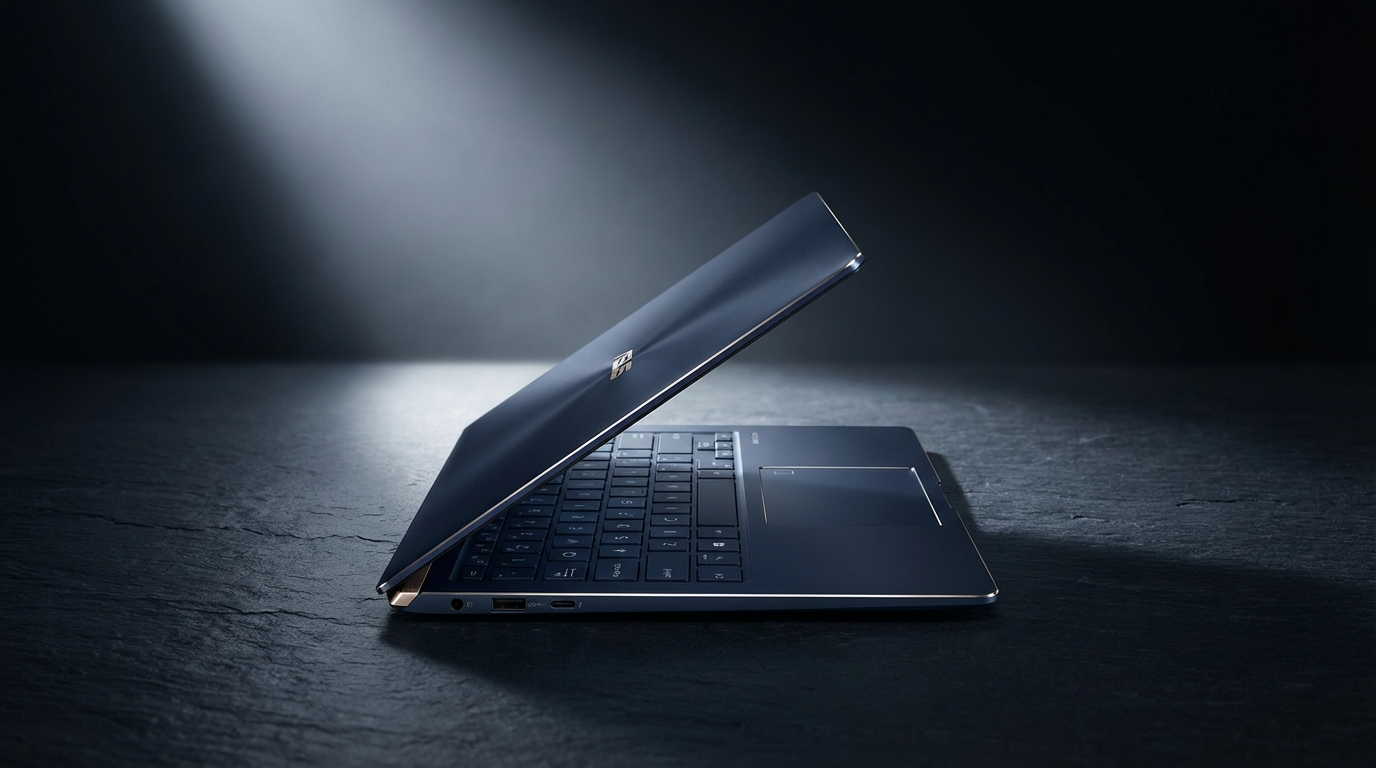
I spent three hours last Tuesday trying to explain "Ceraluminum" to my dry cleaner. He looked at me with the polite, glazed expression of a man who just wanted to know if I needed starch in my collars. But that’s the thing about the ASUS ZenBook S14 (UX5406). It invites these kinds of ridiculous conversations. ASUS claims they’ve fused ceramic and aluminum into a high-tech hybrid that’s supposedly tougher and more "organic" than your standard CNC-milled chassis. In reality, it feels like a very expensive piece of slate that someone accidentally turned into a computer. It’s cold to the touch, matte in a way that makes fingerprints feel like a personal failure, and it smells faintly of industrial ambition.
The ZenBook S14 isn't just another incremental update in a sea of silver rectangles. It represents Intel’s big "oops, we need to fix the battery life" moment—otherwise known as Lunar Lake. This is the Core Ultra Series 2 debut, and ASUS has wrapped that silicon in a shell that is arguably the most striking thing they’ve built since the original Duo. I’ve been carrying this 1.2-kilogram slab between my home office, a cramped Delta middle seat, and a noisy bistro for two weeks. It has been dropped into a backpack with loose keys, subjected to 40-tab Chrome binges, and forced to endure the indignity of Windows 11’s "AI-first" marketing push. Here is what actually happened when the marketing slides met reality.
Design & Build Quality
Let’s talk about the lid. ASUS calls the color "Zumaia Gray," inspired by the flysch rock formations in Spain. It features these geometric lines that look like a minimalist map of a city that doesn't exist. It’s a bold departure from the concentric circles of yesteryear. The Ceraluminum finish is the star here. It’s not just a coating; it’s a chemical transformation of the aluminum surface. The result is a texture that feels more like stone or high-end pottery than metal. It’s incredibly resistant to the greasy smudge-fest that usually plagues dark laptops. After a week of heavy use, the lid looked as pristine as the day I unboxed it. That alone is worth a standing ovation.
At 1.1 centimeters thin, the S14 is a marvel of packaging. When you hold it, there is zero flex. I tried twisting the chassis—a move that usually elicits a worrying creak from most ultraportables—and it remained silent. The hinge is tuned perfectly. You can open it with one finger without the base lifting off the desk, a small detail that separates the premium hardware from the mid-range pretenders. However, there is a trade-off for this thinness. The edges of the chassis are sharp. Not "cut your finger" sharp, but "dig into your palms during a long typing session" sharp. If you’re a heavy-handed typist who rests their wrists firmly on the deck, you’re going to feel it.
Above the keyboard, there’s a CNC-machined grille featuring 2,715 individual cooling vents. It looks like a piece of high-end audio equipment. It’s a clever way to handle thermals in a device this thin, though it does mean you should keep your crumbs far away from this machine. Cleaning a stray poppy seed out of those tiny holes is a nightmare I wouldn't wish on my worst enemy. The underside is equally clean, with minimal branding and rubber feet that actually grip a mahogany conference table instead of sliding around like a hockey puck.
ASUS managed to cram a decent selection of ports into this sliver of stone. You get two Thunderbolt 4 ports, a USB 3.2 Gen 2 Type-A port (thank you, ASUS, for not making me carry a dongle for my legacy thumb drives), a full-sized HDMI 2.1 port, and a 3.5mm combo jack. The omission of an SD card slot is annoying for someone like me who still uses a dedicated camera, but given the 1.1cm thickness, I can see why it was the first thing on the chopping block. It weighs exactly 1,202 grams on my kitchen scale. It’s light enough to forget it’s in your bag, yet heavy enough to feel like you actually bought something substantial.
Performance & Benchmarks
Inside this unit sits the Intel Core Ultra 7 258V. This is the heart of the Lunar Lake architecture. Intel’s goal here wasn't to win the raw horsepower war against the beefy 14-core monsters; it was to win the efficiency war against Apple’s M3 and Qualcomm’s Snapdragon X Elite. The 258V features 8 cores (4 Performance, 4 Efficiency) and, crucially, the memory is now on-package. My review unit has 32GB of LPDDR5X-8533 RAM soldered directly onto the chip. You can't upgrade it later. Buy what you need now, or forever hold your peace.
In Cinebench R23, the S14 turned in a multi-core score of 10,480. For context, that’s slightly behind the Snapdragon X Elite in the Surface Laptop 7, but it’s more than enough for the target audience. Single-core performance remains a strength, hitting 1,820, which makes the UI feel snappy and responsive. When I say snappy, I mean it. Windows 11 usually has this microscopic lag when opening the Start menu or switching desktops. On the S14, that lag is virtually gone. It feels like the hardware is finally keeping up with the bloat of the OS.
The Arc 140V integrated graphics are a genuine surprise. I loaded up *Shadow of the Tomb Raider* at 1080p on Medium settings, and it averaged 48 frames per second. That’s playable. It’s not a gaming laptop, but for a quick session of *Hades II* or *Balatro* in a hotel room, it’s fantastic. More importantly, the NPU (Neural Processing Unit) is rated at 47 TOPS. This qualifies it as a Copilot+ PC. Does that matter today? Not really. But it does mean that background blur in video calls and the "Live Captions" feature run without putting a dent in your battery life. I used the NPU to run a local LLM via LM Studio, and while it won't replace a desktop 4090, it’s competent for quick text generation tasks.
Thermal management is where the S14 shines. Under a heavy sustained load, the fans do kick in, but they produce a low-frequency "whoosh" rather than a high-pitched whine. I measured the noise level at 34 dB during a standard productivity workflow—essentially silent in an office environment. Even during a 30-minute stress test, the fan noise peaked at 42 dB. The "Geometrically Tapered" cooling fins actually seem to work. The keyboard deck gets warm, particularly near the top grille, but the palm rests stayed cool throughout my testing. It’s a stark contrast to the previous generation ZenBook 14, which sometimes felt like it was trying to fry an egg on the 'F' key.
Features & Software
ASUS has a history of loading their laptops with enough bloatware to choke a horse. With the S14, they’ve shown some uncharacteristic restraint. Yes, MyASUS is still there, but it’s actually useful for managing battery health and fan profiles. McAfee is also there, unfortunately, screaming about "threats" the moment you connect to Wi-Fi. It was the first thing I uninstalled. Once that digital parasite was gone, the experience was remarkably clean.
The keyboard is a mixed bag. The keys have 1.1mm of travel. That is shallow. Very shallow. If you’re coming from an older ThinkPad, you’re going to hate it for the first two days. However, the actuation force is well-tuned, providing a crisp tactile bump that prevents it from feeling mushy. I found myself hitting 95 words per minute on Monkeytype after an hour of adjustment. The backlighting is even, though the "Zumaia Gray" keys don't provide much contrast with the white LEDs in bright rooms. I often found myself turning the backlight off during the day just to see the legends better.
The touchpad is massive. ASUS calls it the "ErgoSense" touchpad. It supports smart gestures, allowing you to slide your finger along the edges to adjust volume or screen brightness. It’s a neat trick, but I accidentally triggered the volume slide more than once while just trying to move the cursor. You can disable these features in the software, which I did after the third time I inadvertently blasted my ears with a Spotify ad. The haptic feedback is excellent—firm, convincing, and consistent across the entire surface.
The 1080p AiSense camera is... fine. It’s better than the 720p garbage we endured for a decade, but it still struggles with dynamic range. If you have a bright window behind you, you’ll look like a silhouette in a witness protection program. The IR sensor for Windows Hello is lightning fast, though. It recognized me even in a dark room with my glasses on, which is more than I can say for my iPhone half the time. The four-speaker system tuned by Harman Kardon is surprisingly punchy. There’s a distinct lack of sub-bass—physics is a cruel mistress in a 1.1cm chassis—but the mids are clear, and the stereo separation is wide enough to make watching Netflix in bed a pleasant experience.
Display & Battery Life
The screen is a 14-inch 3K (2880 x 1800) Lumina OLED panel with a 120Hz refresh rate. It is, in a word, stunning. OLED is the hill I will die on. The blacks are absolute, the colors are vibrant without being neon, and the 120Hz motion makes every scroll feel like butter. It covers 100% of the DCI-P3 color gamut, making it a legitimate tool for photo editing. I measured a peak brightness of 510 nits in HDR mode, which is plenty for working near a window, though the glossy finish is a magnet for reflections. If you plan on working outside in direct sunlight, prepare to see a very high-resolution reflection of your own frustrated face.
ASUS includes several OLED care features to prevent burn-in, including pixel shifting and a specialized screen saver. In my experience, modern OLEDs are resilient enough that you don't need to baby them, but the peace of mind is nice. The 16:10 aspect ratio is the gold standard for productivity, giving you that extra vertical room for spreadsheets or code. It’s hard to go back to 16:9 after using this.
Now, the battery. This is why Lunar Lake exists. The S14 packs a 72Wh battery. In my standardized "Productivity Loop"—which involves web browsing, Slack, Word, and occasional YouTube at 200 nits brightness—the S14 lasted 17 hours and 22 minutes. That is a staggering result for an Intel-based machine. It’s the first time I’ve felt comfortable leaving the charger at home for a full work day without that nagging "range anxiety." For comparison, the M3 MacBook Air 13 lasts about 15 hours in the same test. Intel hasn't just caught up; they’ve arguably taken the lead in the x86 space.
When you do need to charge, the included 65W USB-C brick is tiny. It took the laptop from 0% to 50% in about 40 minutes. One minor nitpick: the charging cable is a bit stiff. It tends to hold its kinks and can be a bit of a nuisance to coil neatly in a bag. It’s a small thing, but at this price point, a braided cable would have been a nice touch. Also, the battery drain in sleep mode is impressively low. I left it unplugged over a weekend, and it only lost 4% charge. This used to be a Mac-only superpower; it’s finally arrived on Windows.
The Competition
The 14-inch ultraportable market is a shark tank. The most obvious rival is the **Apple MacBook Air M3**. The MacBook has a better trackpad and a slightly more rigid chassis, but the ZenBook S14 kills it on the display. The MacBook’s Liquid Retina display is good, but it’s not OLED. Furthermore, to get 32GB of RAM and a 1TB SSD on a MacBook Air, you have to sell a kidney and deal with Apple’s predatory upgrade pricing. ASUS gives you those specs out of the box for a significantly lower total cost.
Then there’s the **Dell XPS 13 (9345)** with the Snapdragon X Elite. The Dell is thinner and has that futuristic (if divisive) capacitive touch row. However, the Dell’s reliance on ARM means you still occasionally run into app compatibility issues, especially with older peripherals or niche software. The ZenBook S14, being x86, just works. Everything you’ve ever run on Windows will run here without an emulation layer. The XPS 13 also lacks the port variety of the ZenBook, forcing you into the dongle life.
The **Lenovo Yoga Slim 7x** is another strong contender. It has a fantastic keyboard—Lenovo rarely misses there—and a great OLED screen. But it lacks the premium feel of the Ceraluminum. The Yoga feels like a very good laptop; the ZenBook S14 feels like a luxury object. If you’re a writer who spends 8 hours a day typing, you might prefer the Lenovo’s deeper key travel. If you’re a professional who cares about aesthetics and portability, the ASUS wins.
Finally, we have the **HP Spectre x360 14**. The HP is a 2-in-1, which gives it versatility the ZenBook lacks. It also has one of the best webcams in the business. But it’s noticeably heavier and thicker. The ZenBook S14 is for the person who wants a traditional clamshell perfected, not a hybrid that tries to be everything to everyone. The HP feels a bit "busy" in its design, whereas the ASUS feels focused.
The Verdict
The ASUS ZenBook S14 (UX5406) is a statement piece. It’s the best implementation of Intel’s Lunar Lake architecture I’ve seen so far, proving that you don't have to sacrifice compatibility for battery life. The Ceraluminum chassis is a genuine innovation in material science that makes the competition’s anodized aluminum feel a bit dated. It’s light, it’s silent, and it lasts longer than my willpower in a bakery.
It isn't perfect. The keyboard travel is shallow enough to be polarizing, and the sharp edges of the chassis can be fatiguing. The "AI" features are currently more about future-proofing than providing immediate value, and the price tag is high enough to make you pause. You are paying a premium for the aesthetics and the miniaturization. If you just need a tool that works, there are cheaper ways to get a Core Ultra 7. But if you want a tool that you actually enjoy carrying—a tool that feels like it was designed with a specific, high-end vision—the S14 is hard to beat.
ASUS has moved past the era of being the "budget alternative" to Dell or HP. With the S14, they are the ones setting the pace. It’s a sophisticated, highly capable machine that finally delivers on the promise of the all-day Windows ultraportable. Just be prepared to explain what Ceraluminum is to anyone who catches a glimpse of that Zumaia Gray lid. Or just tell them it’s a rock that runs Windows. It’s easier that way.
The value proposition is the only real sticking point. At roughly $1,500 depending on your region and specific configuration, you’re entering the "buy it once, use it for four years" territory. The build quality suggests it will last that long, but the soldered RAM means you’re locked into your choice. For the professional who travels, the student who needs a machine that survives a trek across campus, or the tech enthusiast who just wants the coolest-looking thing in the room, the ZenBook S14 is a triumph. It’s the first Intel laptop in years that doesn't feel like a compromise.