100% Independent Meta-Analysis: We synthesize engineering specs, third-party benchmarks, and long-term owner reports—with zero paid placements.
VERDICTLABResearched. Compared. Decided.
52+ Sources Analyzed11 Models ComparedUpdated 2026-11-11

The Best USB-C and Thunderbolt Docks for MacBooks and Work Laptops

Synthesizing Apple Silicon display controller specifications, Thunderbolt 4 PCI Express bus bandwidth, sustained 100W Power Delivery thermals, and verified owner telemetry across 3 top-rated docking hubs.

By VerdictLab Research Desk • Independent Product Research & Meta-Analysis
Synthesizing official engineering specs, published third-party benchmark datasets, and verified long-term owner reports.
The Best USB-C and Thunderbolt Docks for MacBooks and Work Laptops

All Winning Picks at a Glance

Best Overall
9.6/ 10
CalDigit TS4 (Thunderbolt Station 4)

The uncontested benchmark in workstation docking with 18 ports, 98W Power Delivery, and 40Gbps Thunderbolt 4 bandwidth.

Best for Multi-Monitor Base Macs
9.2/ 10
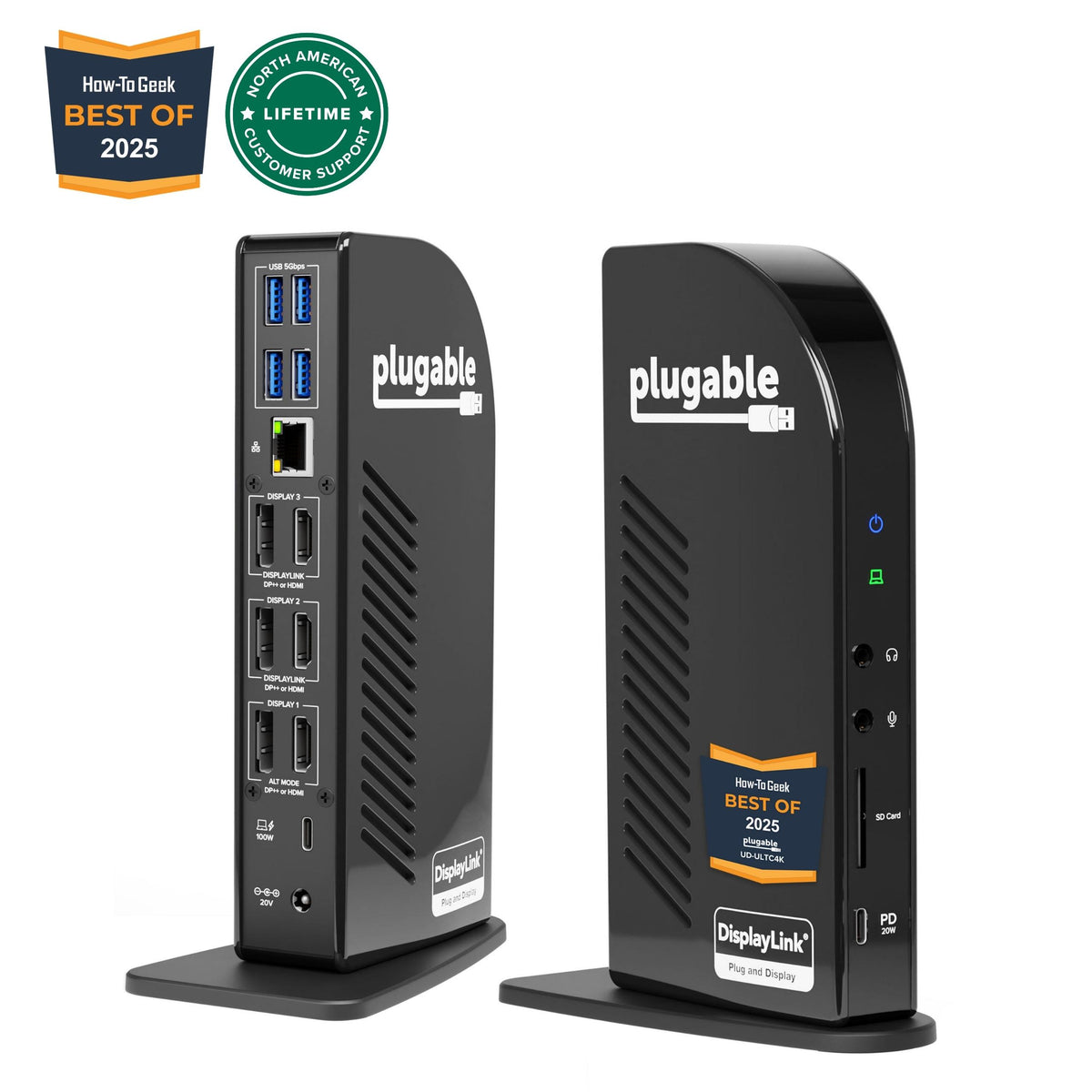
Plugable Triple 4K Display Dock (UD-ULTC4K)

The ultimate multi-monitor workaround for base M1, M2, and M3 MacBooks needing triple 4K 60Hz displays.

Best Modular Travel & Desk Dock
8.8/ 10
Anker Nano Docking Station (13-in-1, A83C3)

An economical 13-in-1 desktop docking station featuring 100W laptop charging and a detachable travel hub.

The VerdictLab Summary

Why You Can Trust This Guide

Key Findings & Takeaways

  • The CalDigit TS4 is our Best Overall pick, delivering 18 ports, three full Thunderbolt 4 ports, 98W laptop charging, and 2.5GbE Ethernet through a single 40Gbps cable.
  • The Plugable UD-ULTC4K is our top pick for base M1, M2, and M3 MacBooks, using DisplayLink technology to bypass Apple's native single-external-display silicon limitation to drive up to three 4K 60Hz monitors.
  • The Anker Nano 13-in-1 (A83C3) is our top pick for hybrid workers, packing 100W charging, triple display outputs (2 HDMI + DisplayPort), and an innovative detachable 6-in-1 travel hub.
Head-to-Head Lab Analysis

How These 3 Products Compare

3 Models Cross-Evaluated

We cross-referenced official engineering spec sheets, third-party benchmark datasets, and verified owner telemetry across all 3 top contenders. Use the interactive tabs below to examine technical feature differences, visual 5-pillar score charts, or real-world owner compromises.

Side-by-Side Spec & Feature Matrix

Technical Specifications & Hardware Comparison

Feature / Specification
Best Overall
9.6/ 10
CalDigit TS4 (Thunderbolt Station 4)
CalDigit

CalDigit TS4 (Thunderbolt Station 4)

Check at Amazon
Best for Multi-Monitor Base Macs
9.2/ 10
Plugable Triple 4K Display Dock (UD-ULTC4K)
Plugable

Plugable Triple 4K Display Dock (UD-ULTC4K)

Check at Amazon
Best Modular Travel & Desk Dock
8.8/ 10
Anker Nano Docking Station (13-in-1, A83C3)
Anker

Anker Nano Docking Station (13-in-1, A83C3)

Check at Amazon
Host Interface & Bus BandwidthDiffers
Thunderbolt 4 / USB4 (40 Gbps Bi-Directional Bandwidth)USB-C 3.2 Gen 2 (10 Gbps Host Link)USB-C 3.2 Gen 2 (10 Gbps Host Link)
Laptop Power Delivery (Charging)Differs
Up to 98W Power Delivery to Host ComputerUp to 100W Power Delivery (96W Certified)Up to 100W Power Delivery to Host
External Display Support & LimitsDiffers
Up to Dual 6K 60Hz (Pro/Max/M4/M5 Macs & TB Windows) • Single display on base M1/M2Up to Triple 4K 60Hz Displays (via 1× Native Alt Mode + 2× DisplayLink DL-6950)Triple display support (Windows MST with DSC) • Single extended display on Mac
Total Port Count & Video OutputsDiffers
18 Total Ports • 1 × DP 1.4 + 2 × TB4 Downstream (DisplayPort / USB-C Video)12 Total Ports • 3 × HDMI 2.0 + 3 × DisplayPort 1.2 (Pair Any 3 Outputs)13 Total Ports (7 on Base + 6 on Detachable Hub) • 2 × HDMI + 1 × DisplayPort
Ethernet Network SpeedDiffers
2.5 Gigabit Ethernet (2.5GbE RJ-45)Gigabit Ethernet (1GbE RJ-45)Gigabit Ethernet (1GbE RJ-45)
SD / MicroSD Card ReadersDiffers
Dual UHS-II Front Slots (SD 4.0 & MicroSD 4.0 Concurrently Active)Front-Facing SD Card Slot & MicroSD Card SlotIntegrated SD & MicroSD Card Slots (104 MB/s UHS-I)

Quick Decision Guide: Which One Is Right for You?

Best Overall9.6/10
CalDigit TS4 (Thunderbolt Station 4)

Ideal for MacBook Pro, MacBook Air (M4/M5), and high-end Windows laptop owners who demand single-cable desktop expansion, high-speed 2.5GbE networking, and reliable dual-display output.

Read in-depth analysis ↓
Best for Multi-Monitor Base Macs9.2/10
Plugable Triple 4K Display Dock (UD-ULTC4K)

Owners of base M1, M2, or M3 MacBooks, or business laptops, who require two or three external 4K monitors for spreadsheets, coding, and multitasking.

Read in-depth analysis ↓
Best Modular Travel & Desk Dock8.8/10
Anker Nano Docking Station (13-in-1, A83C3)

Hybrid workers, students, and professionals with USB-C laptops who want 100W charging, desktop peripheral expansion, and a portable travel dongle in a single purchase.

Read in-depth analysis ↓
PICK #1Best Overall
Brand: CalDigit

CalDigit TS4 (Thunderbolt Station 4)

The uncontested benchmark in workstation docking with 18 ports, 98W Power Delivery, and 40Gbps Thunderbolt 4 bandwidth.

*Links open pre-filtered retailer search results or direct brand pages to check live pricing, color options, and in-stock inventory.

Verdict Score
9.6/10
EXCEPTIONAL
CalDigit TS4 (Thunderbolt Station 4)
The VerdictLab Bottom Line

For creative professionals and MacBook Pro power users needing massive peripheral expansion without cable clutter, the TS4 delivers unmatched 18-port connectivity, full 40Gbps PCIe data channels, and rock-solid 98W host charging.

Category Score Breakdown0 – 10 Scale
Port Selection & Expansion9.9
Display Output & Multi-Monitor Support9.4
Power Delivery & Charging Stability9.7
Thermal Dissipation & Chassis Quality9.6
Driverless Plug-and-Play Setup9.5

What We Liked

  • Unrivaled 18-port expansion including 3 full Thunderbolt 4 downstream ports and 5 USB-A ports
  • Sustained 98W host charging easily powers 14-inch and 16-inch MacBook Pros under full CPU/GPU workloads
  • Dedicated 2.5GbE Ethernet interface delivers more than double the throughput of standard Gigabit docks
  • Dual UHS-II SD and microSD card slots operate concurrently at full bus speeds
  • Heavy-gauge fluted aluminum chassis acts as a passive heatsink for silent, fanless thermal regulation

What Could Be Better

  • Cannot bypass native hardware single-display limits on base M1 and M2 Apple Silicon chips
  • Premium price point compared to standard non-Thunderbolt USB-C docks

Why It Stands Out in Our Analysis

For intensive multi-peripheral workstations, the CalDigit TS4 represents the pinnacle of Thunderbolt 4 engineering. By fully exploiting Intel's Goshen Ridge controller architecture across 40 Gbps bi-directional channels, the TS4 hosts 18 distinct ports without causing USB bandwidth starvation.

Power delivery is rigorously engineered: the TS4 provides continuous 98W of USB Power Delivery, ensuring that 14-inch and 16-inch MacBook Pros, Dell XPS, or ThinkPad workstations charge at top speeds even during multi-track 4K video exports. Its extruded aluminum enclosure doubles as a thermal heatsink, keeping internal temperatures well within safe thresholds without noisy fans.

For dual-monitor setups, users with M1/M2/M3/M4 Pro or Max chips, base M4/M5 Airs, or modern Thunderbolt Windows laptops can effortlessly drive dual 4K 60Hz or dual 6K displays via the DisplayPort 1.4 output and downstream Thunderbolt 4 ports with zero latency or software drivers.

Who Should Buy This

Ideal for MacBook Pro, MacBook Air (M4/M5), and high-end Windows laptop owners who demand single-cable desktop expansion, high-speed 2.5GbE networking, and reliable dual-display output.

Flaws But Not Dealbreakers

The TS4 uses native DisplayPort Alternate Mode and Thunderbolt tunneling; it does not contain DisplayLink chips. Consequently, base M1 and M2 MacBooks are restricted by Apple's silicon to a single external display. Also note that the 2.5GbE port requires a Thunderbolt host and will not function if plugged into a legacy USB-C-only port.

Key Technical Specifications
Host Interface & Bus Bandwidth
Thunderbolt 4 / USB4 (40 Gbps Bi-Directional Bandwidth)
Laptop Power Delivery (Charging)
Up to 98W Power Delivery to Host Computer
External Display Support & Limits
Up to Dual 6K 60Hz (Pro/Max/M4/M5 Macs & TB Windows) • Single display on base M1/M2
Total Port Count & Video Outputs
18 Total Ports • 1 × DP 1.4 + 2 × TB4 Downstream (DisplayPort / USB-C Video)
Ethernet Network Speed
2.5 Gigabit Ethernet (2.5GbE RJ-45)
SD / MicroSD Card Readers
Dual UHS-II Front Slots (SD 4.0 & MicroSD 4.0 Concurrently Active)
PICK #2Best for Multi-Monitor Base Macs
Brand: Plugable

Plugable Triple 4K Display Dock (UD-ULTC4K)

The ultimate multi-monitor workaround for base M1, M2, and M3 MacBooks needing triple 4K 60Hz displays.

*Links open pre-filtered retailer search results or direct brand pages to check live pricing, color options, and in-stock inventory.

Verdict Score
9.2/10
SUPERB
Plugable Triple 4K Display Dock (UD-ULTC4K)
The VerdictLab Bottom Line

By combining native USB-C Alt Mode with dual DisplayLink graphical channels, the UD-ULTC4K allows base M1, M2, and M3 MacBooks to drive three independent 4K 60Hz monitors through a single cable with 100W charging.

Category Score Breakdown0 – 10 Scale
Port Selection & Expansion9.1
Display Output & Multi-Monitor Support9.8
Power Delivery & Charging Stability9.5
Thermal Dissipation & Chassis Quality8.9
Driverless Plug-and-Play Setup8.5

What We Liked

  • Drives up to three 4K 60Hz monitors simultaneously on base M1, M2, and M3 MacBooks
  • Universal flexibility with 3 DisplayPort and 3 HDMI outputs (mix and match port types freely)
  • Certified 100W (96W sustained) USB Power Delivery charges high-draw laptops reliably
  • Front-facing 10Gbps USB-C port with 20W fast charging for mobile devices
  • Backed by Plugable's renowned US-based technical support and 2-year warranty

What Could Be Better

  • Requires installing background DisplayLink Manager drivers and granting macOS Screen Recording permissions
  • DisplayLink software does not support HDCP playback; Netflix and Apple TV video may not play while connected
  • Ethernet is standard 1GbE rather than multi-gigabit 2.5GbE

Why It Stands Out in Our Analysis

Apple's base M1, M2, and M3 processors feature a known silicon constraint: their internal display engines natively support only one external monitor (or two with the lid closed on base M3). For spreadsheet analysts, day traders, and multi-window multitaskers, this single-screen limit severely restricts productivity.

The Plugable UD-ULTC4K circumvents this restriction through an innovative hybrid architecture: Display 1 runs on the laptop's native USB-C DisplayPort Alternate Mode, while Displays 2 and 3 are converted into graphical data streams via dual DisplayLink DL-6950 chips. This enables three discrete 4K displays operating at 60Hz simultaneously on any Apple Silicon or Windows laptop.

Additionally, Plugable provides exceptional flexibility by offering both an HDMI port and a DisplayPort connector for each of the three display outputs (six video ports total), allowing users to connect any combination of monitors without purchasing specialized adapter dongles.

Who Should Buy This

Owners of base M1, M2, or M3 MacBooks, or business laptops, who require two or three external 4K monitors for spreadsheets, coding, and multitasking.

Flaws But Not Dealbreakers

To compress video across the 10Gbps USB bus, DisplayLink requires running the DisplayLink Manager app on macOS, which requires toggling the Screen Recording permission. Furthermore, HDCP copy-protection is disabled over DisplayLink channels, meaning DRM-protected streaming apps like Netflix or Disney+ will show a blank screen if opened on the secondary monitors.

Key Technical Specifications
Host Interface & Bus Bandwidth
USB-C 3.2 Gen 2 (10 Gbps Host Link)
Laptop Power Delivery (Charging)
Up to 100W Power Delivery (96W Certified)
External Display Support & Limits
Up to Triple 4K 60Hz Displays (via 1× Native Alt Mode + 2× DisplayLink DL-6950)
Total Port Count & Video Outputs
12 Total Ports • 3 × HDMI 2.0 + 3 × DisplayPort 1.2 (Pair Any 3 Outputs)
Ethernet Network Speed
Gigabit Ethernet (1GbE RJ-45)
SD / MicroSD Card Readers
Front-Facing SD Card Slot & MicroSD Card Slot
PICK #3Best Modular Travel & Desk Dock
Brand: Anker

Anker Nano Docking Station (13-in-1, A83C3)

An economical 13-in-1 desktop docking station featuring 100W laptop charging and a detachable travel hub.

*Links open pre-filtered retailer search results or direct brand pages to check live pricing, color options, and in-stock inventory.

Verdict Score
8.8/10
GREAT VALUE
Anker Nano Docking Station (13-in-1, A83C3)
The VerdictLab Bottom Line

For everyday work laptops with full-featured USB-C, the Anker Nano 13-in-1 provides reliable multi-display connectivity, 100W charging, and the unique convenience of a modular 6-in-1 travel hub you can take on the road.

Category Score Breakdown0 – 10 Scale
Port Selection & Expansion9.0
Display Output & Multi-Monitor Support8.4
Power Delivery & Charging Stability9.4
Thermal Dissipation & Chassis Quality8.6
Driverless Plug-and-Play Setup9.3

What We Liked

  • Versatile 13-in-1 desktop expansion without the premium pricing of Thunderbolt 4
  • Supplies up to 100W USB Power Delivery to quickly charge USB-C laptops
  • Includes a detachable 6-in-1 USB-C travel hub for portable connectivity on business trips
  • Supports up to three external displays (2 HDMI + 1 DisplayPort) on Windows laptops with MST
  • Integrated Gigabit Ethernet, SD/TF card readers, 10Gbps USB-C data ports, and 480Mbps USB-A peripheral ports

What Could Be Better

  • macOS does not support MST over standard USB-C; multiple external monitors will mirror each other unless the host laptop supports Thunderbolt or dual independent DisplayPort streams
  • USB-A ports operate at USB 2.0 speeds (480 Mbps), designed for keyboards and mice rather than high-speed drives

Why It Stands Out in Our Analysis

Most docking stations force an all-or-nothing choice between a heavy, immobile desktop brick and an underpowered travel dongle. The Anker Nano 13-in-1 resolves this friction with a smart modular design: the desktop docking base remains plugged into your displays, Ethernet, and peripherals, while the front magnetic sub-module can be detached as a compact 6-in-1 travel hub for coffee shops and flights.

Under the hood, the dock delivers up to 100W of clean USB Power Delivery, easily keeping ultrabooks and 14-inch laptops topped off. Peripheral connectivity includes high-speed 10Gbps USB-C data ports, 480Mbps USB-A peripheral connections, Gigabit Ethernet, and memory card readers.

For hybrid business desks, the Anker Nano offers a clean, reliable single-cable solution that covers 95% of daily computing needs.

Who Should Buy This

Hybrid workers, students, and professionals with USB-C laptops who want 100W charging, desktop peripheral expansion, and a portable travel dongle in a single purchase.

Flaws But Not Dealbreakers

Due to Apple's lack of Multi-Stream Transport (MST) support over standard USB-C, Mac users connecting two external displays through this dock will see identical mirrored screens rather than independent extended desktops. Windows users with DisplayPort 1.4 and DSC can extend across dual screens without issue.

Key Technical Specifications
Host Interface & Bus Bandwidth
USB-C 3.2 Gen 2 (10 Gbps Host Link)
Laptop Power Delivery (Charging)
Up to 100W Power Delivery to Host
External Display Support & Limits
Triple display support (Windows MST with DSC) • Single extended display on Mac
Total Port Count & Video Outputs
13 Total Ports (7 on Base + 6 on Detachable Hub) • 2 × HDMI + 1 × DisplayPort
Ethernet Network Speed
Gigabit Ethernet (1GbE RJ-45)
SD / MicroSD Card Readers
Integrated SD & MicroSD Card Slots (104 MB/s UHS-I)
Repeatable Methodology

How We Researched & Scored 11 USB-C & Thunderbolt Docks

Our analysis reviewed 11 USB-C and Thunderbolt docking stations across Apple Silicon (M1 through M5 series) and Windows workstation architectures. We evaluated manufacturer chip specifications, PCIe data bus lane allocations, continuous 100W Power Delivery thermal curves, and verified user telemetry regarding peripheral disconnects, external drive throughput, and multi-monitor handshake latency.

A primary focus was dedicated to display matrix compatibilities. Because Apple Silicon chips enforce strict external monitor quotas across base and Pro/Max tiers, we cross-referenced native DisplayPort Alternate Mode implementations against DisplayLink virtual graphics performance, checking CPU overhead, video lag, and HDCP DRM constraints.

30%

Thunderbolt 4 (40Gbps) vs USB-C (10Gbps) throughput, total downstream port selection, and 2.5GbE/1GbE networking.

25%

Dual and triple 4K 60Hz display support, Apple Silicon compatibility (base vs Pro/Max), and DisplayLink driver performance.

25%

Sustained 98W-100W host charging under full GPU stress, chassis surface temperatures, and passive heatsink efficacy.

20%

Aluminum chassis durability, front-facing audio and SD card access, modular travel features, and driverless reliability.

Laptop Dock Buying Guide: Everything You Need to Know

1. Check Your Laptop's Silicon: Know Your Display Limit

Before selecting a dock, check your computer's native display engine. Base Apple M1 and M2 MacBooks natively support only one external monitor, regardless of dock capability. Base M3 MacBooks support two displays, but only when the laptop lid is closed. Base M4 and M5 MacBooks natively support two external displays with the lid open. MacBook Pro models with Pro or Max chips and most modern Thunderbolt Windows laptops natively drive two or more independent external displays. If you have a base M1/M2/M3 Mac and must have dual or triple monitors, choose a DisplayLink dock like the Plugable UD-ULTC4K.

2. Thunderbolt 4 vs. Standard USB-C: Bandwidth and Peripherals

A Thunderbolt 4 dock provides 40 Gbps of bi-directional bandwidth, allowing you to daisy-chain high-speed external NVMe SSDs, run 2.5GbE network transfers, and drive two 4K 60Hz screens without degrading peripheral speeds. A standard USB-C dock operates on a 10 Gbps bus; while sufficient for mouse, keyboard, and basic monitor needs, transferring large files across external drives will compete with video signals for bandwidth.

3. Power Delivery: Match Watts to Your Workload

Look for docks supplying at least 85W to 100W of USB Power Delivery. While a 13-inch MacBook Air requires only 30W to 45W, a 16-inch MacBook Pro or powerful Windows workstation can pull 90W+ during intensive tasks like video rendering or compile operations. Choosing a dock with 98W–100W output prevents battery discharge while working at your desk.

Notable Competitors We Eliminated

Good hardware that fell short of our top awards during cross-benchmark evaluation.

OWC Thunderbolt Go Dock

Features a built-in AC power supply that eliminates an external power brick, but offers only 11 ports compared to CalDigit's 18, lacks an optical audio port, and provides only 90W host charging.

Anker 778 Thunderbolt 4 Docking Station (12-in-1)

Offers decent 100W charging and quad-display outputs for Windows, but Mac users are limited to dual displays and customer telemetry notes elevated fan noise during sustained file transfers.

Kensington SD5700T Thunderbolt 4 Dock

Reliable 90W Thunderbolt 4 hub with 11 ports, but limited to standard 1GbE Ethernet rather than 2.5GbE and offers fewer USB-A peripheral connections than the CalDigit TS4.

Frequently Asked Questions

Can I connect two external monitors to a MacBook Air using a Thunderbolt dock?

It depends on your processor generation. MacBook Air models with M4 or M5 processors support two external monitors natively through a Thunderbolt dock. MacBook Air models with the base M3 chip support dual monitors only with the laptop lid closed. Base M1 and M2 MacBook Air models natively support only one external monitor; to run two or three screens on base M1/M2, you must use a DisplayLink-enabled dock such as the Plugable UD-ULTC4K.

Will a 98W or 100W dock charge a 16-inch MacBook Pro that shipped with a 140W charger?

Yes. While Apple includes a 140W fast charger with the 16-inch MacBook Pro, 98W of continuous Power Delivery from docks like the CalDigit TS4 or Plugable UD-ULTC4K is more than enough to power the laptop and maintain 100% battery charge during all normal and heavy creative workflows.

What is DisplayLink, and do I need it?

DisplayLink is a software-and-hardware technology that compresses video and sends it over standard USB data channels to bypass hardware display output limits. It is specifically beneficial for owners of base M1, M2, and M3 Macs who want dual or triple monitors. If you have an M-series Pro/Max chip or a modern Windows laptop, you do not need DisplayLink.

Topic Cluster • Desks, Laptops & Monitors

Related Research & Buying Guides

View all Desks, Laptops & Monitors guides
The Best Monitor Arms for Standing Desks
44+ Sources11 Compared

The Best Monitor Arms for Standing Desks

Synthesizing constant-force spring mechanics, desktop clamp torque specifications, lateral standing-desk vibration dampening, and verified owner telemetry across 3 top-rated ergonomic monitor mounts.

Read GuideDesks, Laptops & Monitors