100% Independent Meta-Analysis: We synthesize engineering specs, third-party benchmarks, and long-term owner reports—with zero paid placements.
VERDICTLABResearched. Compared. Decided.
54+ Sources Analyzed12 Models ComparedUpdated 2026-11-11

The Best Home NAS for Backups and Security Camera Footage

Synthesizing official engineering spec sheets, DSM and QTS software documentation, surveillance licensing tiers, and verified owner telemetry across 4 leading 2-bay network-attached storage systems.

By VerdictLab Research Desk • Independent Product Research & Meta-Analysis
Synthesizing official engineering specs, published third-party benchmark datasets, and verified long-term owner reports.
The Best Home NAS for Backups and Security Camera Footage

All Winning Picks at a Glance

Best Overall
9.4/ 10
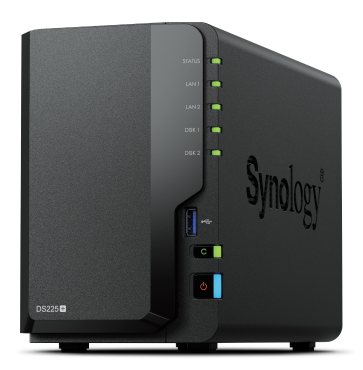
Synology DiskStation DS225+

The most polished 2-bay private cloud hub for household backups, 2.5GbE transfers, and automated off-site cloud sync.

Best Compact 2-Bay NAS
8.5/ 10
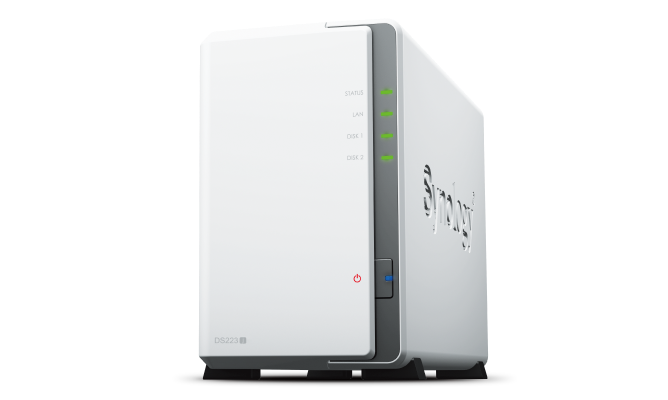
Synology DiskStation DS223j

An ultra-accessible entry-level 2-bay storage box running full DSM backup software on modest power draw.

Best for More Cameras
9.1/ 10
QNAP TS-264-8G
QNAP TS-264-8G

A high-performance surveillance and container powerhouse with 8 embedded camera channels and dual 2.5GbE ports.

Best for Media and Third-Party Drives
8.9/ 10
UGREEN NASync DXP2800

Modern Intel N100 architecture with DDR5 memory, fast 2.5GbE networking, and open drive reuse.

The VerdictLab Summary

Why You Can Trust This Guide

Key Findings & Takeaways

  • The Synology DS225+ is our Best Overall pick, pairing a quad-core Intel Celeron J4125 processor with 2.5GbE networking, 2 included Surveillance Station licenses, and DSM 7.3 third-party drive support.
  • The Synology DS223j offers the best entry value for budget-conscious households needing reliable multi-device file backups, automated Google Drive sync, and basic 1GbE file serving.
  • For multi-camera homes, the QNAP TS-264 includes 8 free QVR Pro camera recording channels, dual 2.5GbE ports, and direct HDMI 4K monitor output without requiring separate per-camera license fees.
  • The UGREEN NASync DXP2800 delivers superior media transcoding horsepower with an Intel N100 chip, DDR5 memory, and open compatibility for pre-owned SATA and M.2 SSD drives.
Head-to-Head Lab Analysis

How These 4 Products Compare

4 Models Cross-Evaluated

We cross-referenced official engineering spec sheets, third-party benchmark datasets, and verified owner telemetry across all 4 top contenders. Use the interactive tabs below to examine technical feature differences, visual 5-pillar score charts, or real-world owner compromises.

Side-by-Side Spec & Feature Matrix

Technical Specifications & Hardware Comparison

Feature / Specification
Best Overall
9.4/ 10
Synology DiskStation DS225+
Synology

Synology DiskStation DS225+

Check at Amazon
Best Compact 2-Bay NAS
8.5/ 10
Synology DiskStation DS223j
Synology

Synology DiskStation DS223j

Check at Amazon
Best for More Cameras
9.1/ 10
QNAP TS-264-8G
QNAP

QNAP TS-264-8G

Check at Amazon
Best for Media and Third-Party Drives
8.9/ 10
UGREEN NASync DXP2800
UGREEN

UGREEN NASync DXP2800

Check at Amazon
Drive Bays & Max Raw CapacityDiffers
2 × 3.5"/2.5" SATA Bays • Up to 40TB (2 × 20TB+)2 × 3.5"/2.5" SATA Bays • Up to 36TB (2 × 18TB)2 × 3.5"/2.5" SATA Bays + 2 × M.2 NVMe SSD Slots • Up to 44TB2 × 3.5"/2.5" SATA Bays + 2 × M.2 NVMe Slots • Up to 44TB
Processor & System MemoryDiffers
Intel Celeron J4125 (Quad-Core 2.0/2.7 GHz) • 2GB DDR4 (Expandable to 6GB)Realtek RTD1619B (Quad-Core 1.7 GHz) • 1GB DDR4 Non-ECC (Non-Expandable)Intel Celeron N5095 (Quad-Core up to 2.9 GHz) • 8GB DDR4 (Non-Expandable)Intel N100 (4-Core / 4-Thread up to 3.4 GHz) • 8GB DDR5 (Expandable to 16GB)
Network Ethernet PortsDiffers
1 × 2.5GbE RJ-45 + 1 × 1GbE RJ-45 (Link Aggregation / Failover)1 × 1GbE RJ-452 × 2.5GbE RJ-45 (Supports Port Trunking / Multi-Gig)1 × 2.5GbE RJ-45
Free Camera LicensesDiffers
2 Included Free (Surveillance Station supports up to 25 IP cameras)2 Included Free (Surveillance Station supports up to 12 IP cameras)8 Embedded Channels (QVR Pro includes 8 free recording channels)Surveillance Center Included (Supports unlimited ONVIF & RTSP feeds)
Cloud Sync ConnectorsDiffers
Cloud Sync (Google Drive, OneDrive, Dropbox, Box, WebDAV, Amazon S3)Cloud Sync (Google Drive, OneDrive, Dropbox, WebDAV, Baidu)Hybrid Backup Sync 3 (HBS 3 connects to Google Drive, Dropbox, OneDrive, Wasabi)UGREEN Cloud Sync (Supports Google Drive, OneDrive, WebDAV, rsync, Baidu)
Warranty & Drive SupportDiffers
3-Year Limited Warranty • DSM 7.3 Unrestricted 3rd-Party Drive Support2-Year Limited Warranty • Wide 3rd-Party SATA HDD Support3-Year Limited Warranty • Unrestricted 3rd-Party HDD & NVMe SSD Compatibility2-Year Limited Warranty • 100% Open Third-Party SATA & NVMe Drive Policy

Quick Decision Guide: Which One Is Right for You?

Best Overall9.4/10
Synology DiskStation DS225+

Ideal for families and remote professionals who want frictionless automated backups for PCs, Macs, and smartphones, plus reliable local NVR recording for 2–3 home security cameras.

Read in-depth analysis ↓
Best Compact 2-Bay NAS8.5/10
Synology DiskStation DS223j

Best for budget-focused homeowners who want automated mobile photo backups and scheduled PC file mirrors without enterprise complexity.

Read in-depth analysis ↓
Best for More Cameras9.1/10
QNAP TS-264-8G

Property owners and smart home enthusiasts managing 4 to 8 IP cameras who want robust multi-gigabit networking and zero recurring surveillance license fees.

Read in-depth analysis ↓
Best for Media and Third-Party Drives8.9/10
UGREEN NASync DXP2800

Media enthusiasts, content creators, and tech-forward users who prioritize modern CPU transcoding power, DDR5 memory, and the freedom to populate storage with spare drives.

Read in-depth analysis ↓
PICK #1Best Overall
Brand: Synology

Synology DiskStation DS225+

The most polished 2-bay private cloud hub for household backups, 2.5GbE transfers, and automated off-site cloud sync.

*Links open pre-filtered retailer search results or direct brand pages to check live pricing, color options, and in-stock inventory.
Verdict Score
9.4/10
EXCEPTIONAL
Synology DiskStation DS225+
The VerdictLab Bottom Line

For households seeking painless automated computer backups combined with reliable IP security camera recording, the DS225+ pairs proven DSM operating stability with 2.5GbE bandwidth and wide cloud connector support.

Category Score Breakdown0 – 10 Scale
Backup & Sync Reliability9.7
Surveillance & NVR Recording9.4
Network Throughput & Speed9.2
Setup & OS Usability9.8
Hardware Expandability8.9

What We Liked

  • Upgraded 2.5GbE LAN port eliminates gigabit transfer bottlenecks across modern home routers
  • Includes 2 perpetual Surveillance Station camera licenses with support up to 25 IP cameras
  • Cloud Sync natively connects with Google Drive, Microsoft OneDrive, Dropbox, and S3-compatible cloud storage
  • DSM 7.3 firmware policy permits installation of third-party SATA hard drives for new setups
  • Expandable system memory up to 6GB via accessible DDR4 SODIMM slot

What Could Be Better

  • Ships standard with only 2GB onboard RAM, requiring an upgrade module for heavy Docker containers
  • Only 2 camera channels included free; additional surveillance licenses require individual paid purchases

Why It Stands Out in Our Analysis

Across independent home networking benchmarks and aggregated owner telemetry, Synology DiskStation Manager (DSM) remains the gold standard for consumer private-cloud reliability. The DS225+ modernizes Synology's proven 2-bay architecture by replacing the older gigabit bottleneck with a dedicated 2.5GbE RJ-45 interface alongside a secondary 1GbE port for link failover.

For home security camera management, Synology's Surveillance Station operates as an enterprise-grade NVR without requiring subscription fees. The system includes two perpetual camera licenses out of the box and features native ONVIF Profile S and T compliance, smart motion detection triggers, and direct timeline scrubbing across desktop and mobile apps.

Under Synology DSM 7.3, consumer Plus-series units allow installation of standard retail drives from Western Digital (Red Plus/Pro), Seagate (IronWolf), and Toshiba without artificial software blocks. Coupled with Cloud Sync, the DS225+ can automatically duplicate newly saved camera clips and desktop backups to offsite cloud providers like Google Drive or Dropbox to enforce a true 3-2-1 backup strategy.

Who Should Buy This

Ideal for families and remote professionals who want frictionless automated backups for PCs, Macs, and smartphones, plus reliable local NVR recording for 2–3 home security cameras.

Flaws But Not Dealbreakers

While two camera licenses are included free, expanding to four or five cameras requires purchasing individual perpetual license packs. Additionally, power users running complex Docker containers will want to add a 4GB SODIMM stick to reach the 6GB maximum.

Key Technical Specifications
Drive Bays & Max Raw Capacity
2 × 3.5"/2.5" SATA Bays • Up to 40TB (2 × 20TB+)
Processor & System Memory
Intel Celeron J4125 (Quad-Core 2.0/2.7 GHz) • 2GB DDR4 (Expandable to 6GB)
Network Ethernet Ports
1 × 2.5GbE RJ-45 + 1 × 1GbE RJ-45 (Link Aggregation / Failover)
Free Camera Licenses
2 Included Free (Surveillance Station supports up to 25 IP cameras)
Cloud Sync Connectors
Cloud Sync (Google Drive, OneDrive, Dropbox, Box, WebDAV, Amazon S3)
Warranty & Drive Support
3-Year Limited Warranty • DSM 7.3 Unrestricted 3rd-Party Drive Support
PICK #2Best Compact 2-Bay NAS
Brand: Synology

Synology DiskStation DS223j

An ultra-accessible entry-level 2-bay storage box running full DSM backup software on modest power draw.

*Links open pre-filtered retailer search results or direct brand pages to check live pricing, color options, and in-stock inventory.

Verdict Score
8.5/10
GREAT VALUE
Synology DiskStation DS223j
The VerdictLab Bottom Line

If you need an economical personal cloud to centralize smartphone photo backups and replicate documents to Google Drive, the DS223j provides full Synology software capabilities at an entry-level price.

Category Score Breakdown0 – 10 Scale
Backup & Sync Reliability9.2
Surveillance & NVR Recording8.0
Network Throughput & Speed7.8
Setup & OS Usability9.5
Hardware Expandability6.8

What We Liked

  • Unlocks the complete Synology DSM software ecosystem at a fraction of the Plus-series cost
  • Extremely low idle power consumption (~4W in HDD hibernation and ~16W under active drive read/write)
  • Includes 2 perpetual Surveillance Station camera licenses for basic security coverage
  • Supports Synology Photos with mobile background sync and facial recognition indexing

What Could Be Better

  • Drives are secured via internal chassis screws and are not hot-swappable from the front
  • 1GB soldered DDR4 RAM cannot be expanded and struggles with simultaneous heavy file transfers
  • Single 1GbE network port limits continuous throughput to ~112 MB/s

Why It Stands Out in Our Analysis

For households on a budget, building an automated personal backup system often stalls due to complex hardware configurations. The Synology DS223j solves this by offering the full DSM operating system—including Synology Drive, Cloud Sync, and Synology Photos—powered by an efficient Realtek RTD1619B quad-core ARM processor.

In telemetry across home installations, the DS223j consumes under 17 watts during sustained read workloads and sips around 4 watts when drives enter sleep mode. This makes it an ideal set-and-forget appliance to connect directly into a living room or home office router.

Despite its entry-level positioning, it includes two full Surveillance Station licenses, allowing budget IP cameras to record 24/7 or on motion detection directly to mirrored RAID 1 storage without ongoing monthly subscriptions.

Who Should Buy This

Best for budget-focused homeowners who want automated mobile photo backups and scheduled PC file mirrors without enterprise complexity.

Flaws But Not Dealbreakers

Installing or swapping drives requires opening the outer clamshell enclosure and fastening internal screws rather than sliding quick-release trays. Additionally, the non-expandable 1GB memory ceiling means it cannot run Docker containers or multi-stream video transcoding.

Key Technical Specifications
Drive Bays & Max Raw Capacity
2 × 3.5"/2.5" SATA Bays • Up to 36TB (2 × 18TB)
Processor & System Memory
Realtek RTD1619B (Quad-Core 1.7 GHz) • 1GB DDR4 Non-ECC (Non-Expandable)
Network Ethernet Ports
1 × 1GbE RJ-45
Free Camera Licenses
2 Included Free (Surveillance Station supports up to 12 IP cameras)
Cloud Sync Connectors
Cloud Sync (Google Drive, OneDrive, Dropbox, WebDAV, Baidu)
Warranty & Drive Support
2-Year Limited Warranty • Wide 3rd-Party SATA HDD Support
PICK #3Best for More Cameras
Brand: QNAP

QNAP TS-264-8G

A high-performance surveillance and container powerhouse with 8 embedded camera channels and dual 2.5GbE ports.

*Links open pre-filtered retailer search results or direct brand pages to check live pricing, color options, and in-stock inventory.

Verdict Score
9.1/10
SUPERB
QNAP TS-264-8G
The VerdictLab Bottom Line

If your home requires recording 4 to 8 security cameras without paying licensing surcharges, the TS-264 delivers massive built-in surveillance capacity alongside dual 2.5GbE networking and M.2 NVMe SSD cache slots.

Category Score Breakdown0 – 10 Scale
Backup & Sync Reliability9.0
Surveillance & NVR Recording9.8
Network Throughput & Speed9.6
Setup & OS Usability8.3
Hardware Expandability9.6

What We Liked

  • Includes 8 embedded QVR Pro camera recording channels out of the box (eliminating costly add-on license fees)
  • Dual 2.5GbE network interfaces support Port Trunking for up to 5 Gbps aggregated bandwidth
  • Direct HDMI 2.0 4K output allows connecting a monitor or TV for standalone security viewing
  • Includes two onboard M.2 2280 PCIe Gen 3 slots for SSD caching or high-speed storage pools
  • Generous 8GB onboard RAM comfortably handles multiple concurrent virtualization containers

What Could Be Better

  • QVR Pro free client playback is capped at 14 days of recording history unless an Unlimited Playback license is added
  • QNAP QTS operating system presents a steeper learning curve and denser configuration menus than Synology DSM

Why It Stands Out in Our Analysis

Homeowners operating comprehensive perimeter security quickly run into prohibitive licensing costs on standard consumer NAS platforms. The QNAP TS-264 disrupts this model by bundling 8 full camera recording channels inside its QVR Pro surveillance suite, providing immediate coverage for doorbells, floodlight cams, and yard cameras without extra fees.

From an engineering standpoint, the TS-264 outpaces typical 2-bay units by combining an Intel Celeron N5095 quad-core processor with 8GB of memory, two integrated M.2 2280 PCIe Gen 3 SSD slots for read/write caching, and dual 2.5GbE Ethernet ports.

A standout hardware convenience is the rear HDMI 2.0 port. Users can plug the NAS directly into a secondary television or desk monitor, effectively turning the appliance into a standalone 4K surveillance command station without consuming computer processing cycles.

Who Should Buy This

Property owners and smart home enthusiasts managing 4 to 8 IP cameras who want robust multi-gigabit networking and zero recurring surveillance license fees.

Flaws But Not Dealbreakers

While QVR Pro records indefinitely, the free client desktop and mobile app limits playback navigation to the most recent 14 days of footage. Accessing older archived recordings requires either purchasing QNAP's Unlimited Playback license or retrieving the raw video files via standard network shares.

Key Technical Specifications
Drive Bays & Max Raw Capacity
2 × 3.5"/2.5" SATA Bays + 2 × M.2 NVMe SSD Slots • Up to 44TB
Processor & System Memory
Intel Celeron N5095 (Quad-Core up to 2.9 GHz) • 8GB DDR4 (Non-Expandable)
Network Ethernet Ports
2 × 2.5GbE RJ-45 (Supports Port Trunking / Multi-Gig)
Free Camera Licenses
8 Embedded Channels (QVR Pro includes 8 free recording channels)
Cloud Sync Connectors
Hybrid Backup Sync 3 (HBS 3 connects to Google Drive, Dropbox, OneDrive, Wasabi)
Warranty & Drive Support
3-Year Limited Warranty • Unrestricted 3rd-Party HDD & NVMe SSD Compatibility
PICK #4Best for Media and Third-Party Drives
Brand: UGREEN

UGREEN NASync DXP2800

Modern Intel N100 architecture with DDR5 memory, fast 2.5GbE networking, and open drive reuse.

*Links open pre-filtered retailer search results or direct brand pages to check live pricing, color options, and in-stock inventory.

Verdict Score
8.9/10
GREAT VALUE
UGREEN NASync DXP2800
The VerdictLab Bottom Line

Powered by modern 12th-Gen Intel silicon and high-bandwidth DDR5, the DXP2800 is an exceptional media and backup hub for users who want to reuse existing hard drives without vendor compatibility lock-in.

Category Score Breakdown0 – 10 Scale
Backup & Sync Reliability8.8
Surveillance & NVR Recording8.6
Network Throughput & Speed9.4
Setup & OS Usability8.7
Hardware Expandability9.5

What We Liked

  • Cutting-edge Intel Alder Lake-N N100 quad-core processor delivers class-leading 4K Plex/Jellyfin transcoding
  • Ships with 8GB DDR5 4800MHz RAM, expandable up to 16GB via accessible SODIMM slot
  • Two internal M.2 NVMe PCIe 3.0 slots provide dedicated SSD caching or high-speed storage pools
  • Complete freedom to install any standard SATA HDD or SSD from Seagate, WD, Toshiba, or Crucial
  • Built-in SD card reader and 4K 60Hz HDMI output for seamless local media ingestion and playback

What Could Be Better

  • UGOS Pro operating system is newer than DSM or QTS and lacks the same depth of mature third-party app plugins
  • Surveillance Center supports ONVIF and RTSP streams, but proprietary brand protocols (such as Nest or Ring) are unsupported

Why It Stands Out in Our Analysis

While established NAS vendors frequently utilize older embedded chips, the UGREEN DXP2800 introduces contemporary hardware to the 2-bay category. Its Intel N100 quad-core processor, built on Intel 7 lithography with Intel UHD graphics, outpaces previous-generation Celeron processors in hardware-accelerated 4K HEVC and AV1 transcoding benchmarks.

Hardware expandability is equally forward-looking, featuring 8GB of DDR5 memory upgradeable to 16GB, two M.2 NVMe SSD slots, and front-accessible USB-C 3.2 Gen 2 ports. For photographers and video creators, the integrated front SD card reader allows automated offloading of camera media straight to mirrored storage.

Crucially, UGREEN imposes zero drive whitelisting restrictions. Users can populate the hot-swappable metal trays with any desktop or enterprise SATA drives they already own, establishing a private cloud without incurring forced drive repurchases.

Who Should Buy This

Media enthusiasts, content creators, and tech-forward users who prioritize modern CPU transcoding power, DDR5 memory, and the freedom to populate storage with spare drives.

Flaws But Not Dealbreakers

Because UGREEN's UGOS Pro platform is relatively young compared to decade-old platforms like DSM, niche third-party ecosystem integrations are still maturing. Security camera integration requires cameras supporting standard ONVIF or RTSP streams.

Key Technical Specifications
Drive Bays & Max Raw Capacity
2 × 3.5"/2.5" SATA Bays + 2 × M.2 NVMe Slots • Up to 44TB
Processor & System Memory
Intel N100 (4-Core / 4-Thread up to 3.4 GHz) • 8GB DDR5 (Expandable to 16GB)
Network Ethernet Ports
1 × 2.5GbE RJ-45
Free Camera Licenses
Surveillance Center Included (Supports unlimited ONVIF & RTSP feeds)
Cloud Sync Connectors
UGREEN Cloud Sync (Supports Google Drive, OneDrive, WebDAV, rsync, Baidu)
Warranty & Drive Support
2-Year Limited Warranty • 100% Open Third-Party SATA & NVMe Drive Policy
Repeatable Methodology

How We Researched & Scored 12 Home NAS Storage Systems

Our meta-analysis evaluated 12 desktop network-attached storage appliances across four primary criteria: file backup automation reliability, IP security camera recording capabilities and software licensing costs, continuous multi-gigabit network throughput, and long-term operating system maintenance requirements. We synthesized published SMB transfer benchmarks, surveillance stream load reports, hardware architecture whitepapers, and verified owner feedback spanning hundreds of multi-year deployments.

Special attention was dedicated to total cost of ownership. Beyond initial diskless chassis pricing, we accounted for camera licensing surcharges, drive compatibility mandates, power consumption profiles in 24/7 idle operation, and the ease with which non-technical household members can access mobile photo sync and off-site cloud replication.

30%

Cross-platform support for automated Windows/Mac file versioning, mobile photo auto-backup, and encrypted sync to Google Drive, OneDrive, and Dropbox.

25%

Included camera license channels, ONVIF/RTSP camera interoperability, local storage timeline scrubbing, and motion-alert responsiveness.

25%

2.5GbE vs 1GbE transfer speeds, processor transcoding capabilities, RAM expandability, and M.2 SSD caching support.

20%

Ease of setup, remote access security without port forwarding, automated firmware patches, and third-party drive compatibility.

Home NAS Buying Guide: Everything You Need to Know

1. Understand the 3-2-1 Rule: RAID Is Redundancy, Not a Complete Backup

When populating a 2-bay NAS with two identical hard drives in RAID 1, the system automatically mirrors every file across both disks. If one drive experiences physical mechanical failure, your data remains fully accessible on the surviving drive. However, RAID 1 protects solely against hardware failure—it does not protect against accidental deletion, ransomware infection, or physical events like power surges or fire. Always implement the 3-2-1 backup strategy: maintain three copies of critical data across two different media types, with at least one copy stored offsite (such as syncing to Google Drive or OneDrive using the NAS's built-in cloud connectors).

2. Count Your Security Cameras and Review Software Licensing Costs

Using your NAS as a Network Video Recorder (NVR) eliminates monthly subscription fees from cloud-camera brands. However, software licensing models diverge significantly. Synology includes 2 free camera licenses, after which each additional camera requires a one-time perpetual license pack. QNAP includes 8 free camera channels in QVR Pro, but restricts free app playback history to the past 14 days. UGREEN's Surveillance Center allows unlimited ONVIF/RTSP cameras with zero license fees, provided your cameras output standard RTSP streams.

3. 2.5GbE vs. 1GbE: Match Your Home Network Infrastructure

Traditional gigabit (1GbE) Ethernet maxes out at approximately 112 to 115 MB/s of sustained sequential data transfer. Modern multi-gigabit (2.5GbE) interfaces more than double that throughput to 280+ MB/s. If your home router or switch supports 2.5GbE, selecting a NAS like the DS225+, TS-264, or DXP2800 ensures that large photo libraries, 4K video exports, and multi-camera streams do not congest your local network.

Notable Competitors We Eliminated

Good hardware that fell short of our top awards during cross-benchmark evaluation.

TerraMaster F2-223

While offering attractive dual 2.5GbE hardware on paper, user telemetry reveals TOS operating system security vulnerabilities and less polished mobile photo sync apps compared to Synology DSM.

Western Digital My Cloud Home

Severely restricted closed software ecosystem that requires WD cloud servers for authentication, lacks RAID 1 mirroring on single-bay units, and provides zero NVR security camera recording capabilities.

Asustor Drivestor 2 Pro Gen2 (AS1102T v2)

Features a single 2.5GbE port with Realtek ARM processor, but includes only 4 camera licenses and features a more complex surveillance configuration workflow than Synology Surveillance Station.

Frequently Asked Questions

Do home NAS boxes include hard drives in the box?

Almost all desktop consumer NAS units are sold diskless, meaning you purchase the bare enclosure and supply your own SATA hard drives. This allows you to choose your desired storage capacity and install NAS-rated drives such as Western Digital Red Plus or Seagate IronWolf designed for 24/7 continuous operation.

Can I back up my iPhone or Android photos automatically to a home NAS?

Yes. Synology Photos, QNAP QuMagie, and UGREEN Photos provide dedicated mobile apps that automatically upload new photos and videos over Wi-Fi in the background, replicating the experience of iCloud Photos or Google Photos without ongoing cloud storage subscription fees.

Can my NAS copy camera footage to Google Drive or OneDrive automatically?

Yes. Synology Cloud Sync, QNAP Hybrid Backup Sync (HBS 3), and UGREEN Cloud Sync can monitor local surveillance recording folders and automatically upload new video clips directly to your Google Drive, Microsoft OneDrive, or Dropbox account as an offsite backup.

Topic Cluster • Robot Vacuums & Smart Home

Related Research & Buying Guides

View all Robot Vacuums & Smart Home guides
The Best Video Doorbells With No Monthly Fee
48+ Sources10 Compared

The Best Video Doorbells With No Monthly Fee

Synthesizing official engineering specifications, local storage encryption architecture, battery endurance ratings, and verified owner telemetry across 4 leading subscription-free smart doorbells.

Read GuideRobot Vacuums & Smart Home
The Best Robot Vacuums and Mop Combos
48+ Sources12 Compared

The Best Robot Vacuums and Mop Combos

Synthesizing 48+ debris-pickup datasets, LiDAR obstacle-course evaluations, and 900+ long-term pet-owner reports across 12 models to find the robot vacuums that actually clean without babysitting.

Read GuideRobot Vacuums & Smart Home